First-time Mac users find various difficulties while using system-heavy applications and force-quitting them when throttling begins. What happens is they look cluelessly at the keyboard for the Alt key on Mac, but don’t know that Mac has the option key for the functions of the Alt key.
There is no ALT button in macOS, but it is denoted by an Option key and can do seamless things in your system by making combinations with other keys, like right-click on a Mac.
Well, in simple words, the Alt key on Mac is denoted on the keyboard as the Option Key and plays an integral part in the operational and navigational settings of the macOS framework.
Through this option key, you can perform all the actions like shutting down and opening the Mac, taking screenshots, saving files, etc., flawlessly in your MacBook Air, MacBook Pro, and Mac Mini systems.
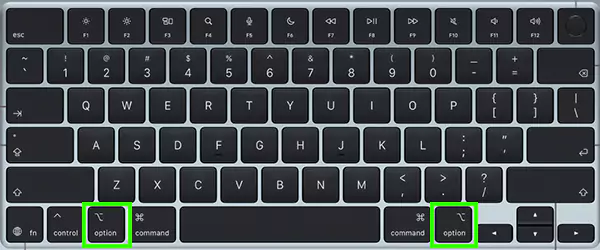
In the Apple Keyboard, the Option key is placed in the two parts of the bottom section, with the name and symbol of the Option key. We have provided an image below that states its proper position and how it can be easily aligned with all the shortcut patterns and assisting typographical functionalities like copy and paste on Mac.
For a video representation of all the MacBook shortcuts and latest updates, you can look for the GetAssist YouTube channel and subscribe to it, along with pressing the bell icon for rapid notifications.
To justify its significance in a broader way, we have calibrated a chart that tells some of the most commonly used and time-saving keyboard shortcuts using the Alt key on Mac. Let’s see how they work.
| Shortcut | Usage |
| Option + Command + Escape | Force Quit |
| Option+ Command+ D | Hide/Show Dock |
| Option + Command + L | Download Folder |
| Option + Shift + Volume Key | Volume increase and decrease |
| Option + Click Apple Menu | Shows Apple System Report |
| Option-Command + Drag | Fosters a symbolic link |
| Option+Delete | Delete Words |
The MacBook Alt button can be used in various situations and can perform multiple tasks by forming combinations with it. Also, the Alt key on Mac, or the Option key, is accessible in almost every Mac system, like MacBook Pro, MacBook Air, Mac mini, etc. That’s why we advise you to read this article thoroughly, and for more such intriguing posts, make sure to count on GetAssist.
The equivalent of the Alt key on a Mac is the Option (⌥) key. It is located next to the Command (⌘) key, and while some modern Apple keyboards only display the ⌥ symbol, it still functions as Alt.
Well, to get the @ sign on Mac, you just need to use a simple shortcut: press and hold Shift + 2, and it works on any MacBook or Magic Keyboard.
Ctrl + F5 on a Mac is generally used to move the keyboard focus directly to the window’s toolbar.