Comulytic Note Pro is best for those who want to record many hours a month, mainly need basic transcription, and don’t want to pay by the minute. Choose Plaud Note Pro if your recordings often i include client commitments, interview quotes, or group discussions that you need to check against the original audio. Plaid Note Pro is a physical AI note taker for face-to-face meetings and phone calls, with longer-range pickup, recording status confirmation, and original audio review. Start by knowing how many hours you’ll record before buying any AI note taker.
| If I care most about | I’d choose | Main reason |
| Lots of basic transcription and lower long-term cost | Comulytic Note Pro | The free plan includes unlimited basic transcription and summaries |
| Group meetings, client commitments and original-audio review | Plaud Note Pro | Pickup, status confirmation, and highlight marking suit formal records better |
| Frequent switching between calls and face-to-face meetings | Plaud Note Pro | Its smart dual-mode recording cuts down on manual switching |
If I only record one or two short meetings a week, my phone is sufficient. But when smart legal tech marketing client meetings run forty or fifty minutes at a time, recording is just the first step. After that, I still have to find the decisions, assign the tasks, and check who promised what. Only once I’m in a lot of these meetings would I buy a separate device.
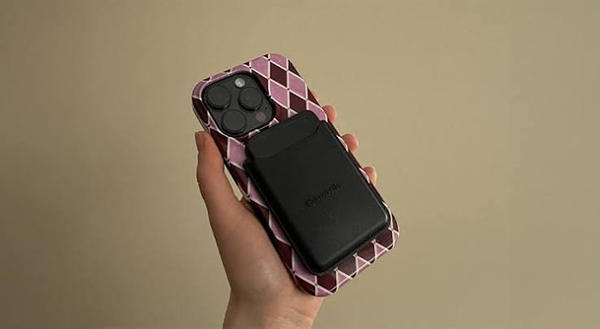
AI’s role in revolutionizing everyday tools and industries is really admirable. Comulytic Note Pro is a card-sized AI recording device that can sit on a desk to cover meetings, or attach to the back of a phone with a magnetic case to record calls. Its free plan already includes unlimited transcription and basic summaries, which affects my selection more than the “AI recording device” label does.
If I have twenty or thirty hours of interviews and meetings to process every month, that difference shows up directly on the bill. That’s exactly why I won’t write Comulytic Note Pro off as a product to reject across the board. It has a very clear reason to purchase: I need a lot of transcription, but I don’t want to calculate how many minutes I have left first.
But as soon as recordings include client commitments, interview quotes, or group meetings, I care about more than “can it turn this into text for free.” I also need to know whether the audio was fully captured, whether speakers were mixed up, and whether I can simply go back to the original recording when the summary gets something wrong. By that standard, I’d treat Plaud Note Pro as the best Comulytic Note Pro alternative.
Comulytic Note Pro’s free plan includes unlimited transcription and basic summaries, so recording more hours in a month doesn’t add to the bill. If I only need to turn a lot of recordings into text, Comulytic Note Pro lets me record and transcribe first, and pay only once I want Deep Dive or more questions.
Lower transcription cost doesn’t prove it will work conveniently in every meeting room, though. Room size, speaking distance, and background noise all change how audio is captured, so I won’t take one “it sounded clear” as a sufficient conclusion.
In a meeting, I’m not trying to gather a nice-sounding piece of audio, and text that reads well is enough most of the time. The trouble is that when the text is disputed, I still need to hear the authentic one.
9to5Mac’s hands-on review states that the device easily picks up rubbing and tapping sounds when it’s touched. When it was attached to the back of a phone, recording volume was low, and transcription accuracy suffered. The writer ended up preferring to lay it flat on a desk. That doesn’t mean every unit or every phone will give the same result, but it reminds me that even though the card form supports both desk and phone use, the two placements may not act the same in practice.
Group meetings bring another issue. In 9to5Mac’s review, speaker identification sometimes merged two people into one and sometimes split one person into two. Notebookcheck’s test ran into something identical: the text itself was good overall, but interjections were assigned to the wrong person. Speaker attribution in four-person audio was even messier.
If I just want to recall which topics a meeting covered, I can fix these issues by hand. If I need the record to confirm “who promised to deliver by Friday,” wrong speaker labels aren’t a small flaw. I have to go back to that point and listen to the original audio, and the summary can only serve as a draft, not the final meeting minutes.
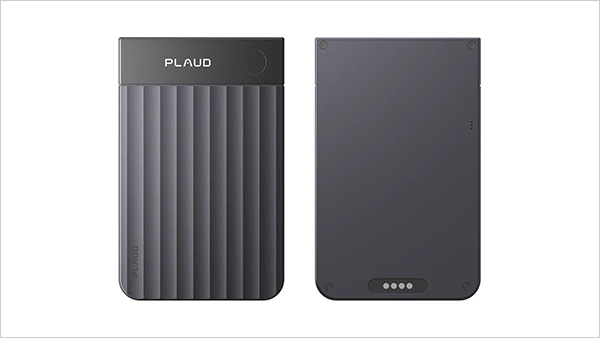
Plaud Note Pro has an InstantView AMOLED display that indicates battery, recording mode,e and file status at a glance. A long press on the physical button starts recording, and a short press when I hear a key decision adds a highlight at that point. After the meeting, I don’t have to search an hour of audio for that line again. I just check those manual markers first.
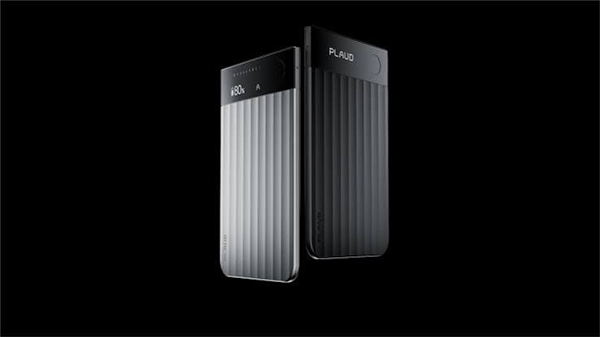
What I admire more is its pickup setup. Plaud Note Pro uses 4 MEMS microphones and 1 VPU with AI-Beamforming, and its official pickup range is up to 5 meters. In face-to-face meetings, the microphone array records the sound, and when it’s attached to the back of a phone, the VPU picks up call vibrations. Smart dual-mode recording switches automatically between calls and meetings.
These are official specs, not a guarantee for every place and accent. But when my setting is six or seven people around a long table with some sitting far from the device, or a day that alternates between calls and in-person meetings, I’d put hardware curated for each of these two sound sources ahead of how many kinds of summaries the software can generate.
On battery life, none of them pulls decisively ahead. Plaud Note Pro records for up to 30 hours in Enhance mode and up to 50 hours in Endurance mode, with up to 60 days of standby. Comulytic Note Pro is officially rated for 45 hours of continuous recording. Both are good for most workdays, and I wouldn’t change my pick over a few extra hours on paper.
The two differ more specifically in free usage. The Plaud Starter Plan includes 300 transcription minutes a month, and heavy users can choose a 1,200-minute or unlimited transcription plan. Comulytic Note Pro’s free plan already comes with unlimited transcription and basic summaries, but the deeper Deep Dive, Instant Abstract, and the number of questions are limited, and full use needs Premium.
| Comparison | Comulytic Note Pro | Plaud Note Pro |
| Form factor | Card-style, sits on a desk or attaches magnetically to the back of a phone | Card-style, sits on a desk or attaches magnetically to the back of a phone |
| Free transcription | Unlimited transcription and basic summaries | Plaud Starter Plan, 300 minutes a month |
| Advanced analysis | Limited uses on the free plan; full use requires Premium | Core features are similar across the three plans; the main difference is transcription minutes |
| Microphones and calls | Officially built for meetings and phone calls | 4 MEMS, 1 VPU, automatic switching between meetings and calls |
| Status display | Small screen shows duration, battery, and connection status | InstantView AMOLED display shows battery, mode, and file status |
| Official continuous recording | Up to 45 hours | Up to 30 hours in Enhance mode, up to 50 hours in Endurance mode |
| Internal storage | 64GB | 64GB |
| Best for | Lots of basic transcription, cost-conscious users, mostly solo or simple meetings | Group meetings, alternating calls and in-person meetings, marking and checking important content |
The first case is when I record for hours, but the content itself isn’t high-risk.
Think course review, personal voice drafts, public lectures, or many internal sync meetings. What I need is to turn dozens of hours of audio into searchable text quickly. Fixing a speaker label now and then won’t impact contracts, quotes, or client commitments. Comulytic Note Pro’s unlimited basic transcription is much easier than tracking a monthly allowance.
The second case is when I only require a readable summary and don’t need to replay the original audio again and again. Comulytic Note Pro’s free plan already includes basic summaries, so if a readable summary is the end product, I don’t want the deeper analysis that requires Premium.
The third case is when there’s no room in the budget for a long-term transcription subscription. Comulytic Note Pro has basic transcription unlimited without a subscription, while on Plaud Note Pro anything past 300 minutes a month means moving to the Plaud Pro Plan or the Plaud Unlimited Plan.
Plaud Note Pro’s hardware price is $189, and it comes with the Plaud Starter Plan’s 300 minutes a month. Comulytic Note Pro’s non-promotional list price is $158.99, and promotional prices vary. As long as its unlimited basic transcription policy stays the same, its long-term cost is easy to control when recording heavily.
| Plan | Hardware price | Annual subscription | Year 1 total | 3-year total | Main allowance |
| Comulytic Note Pro free plan | $158.99 | $0 | $158.99 | $158.99 | Unlimited basic transcription and summaries |
| Comulytic Note Pro + Premium | $158.99 | $120 | $278.99 | $518.99 | Adds Deep Dive, AI suggestions, and full advanced analysis |
| Plaud Note Pro + Starter | $189 | $0 | $189 | $189 | 300 minutes a month |
| Plaud Note Pro + Pro | $189 | $99.99 | $288.99 | $488.97 | 1,200 minutes a month |
| Plaud Note Pro + Unlimited | $189 | $239.99 | $428.99 | $908.97 | Unlimited transcription |
The table uses non-promotional list prices, with hardware bought once and yearly plans renewed continuously, and excludes taxes and shipping. Comulytic Note Pro is often discounted, so the actual checkout price may be lower, but limited-time promotions aren’t a sound basis for verifying long-term cost.
Client discovery meetings, leadership meetings, and interviews are the three types of situations where I’d choose Plaud Note Pro.
These recordings need more than a summary that sounds about perfect. Names, numbers, owners, and deadlines may all need to be looked up again. The 4 MEMS microphones, AI-Beamforming, the VPU for call recording, the physical button, and the highlight feature all solve issues that come before the recording reaches the model.
Plaud’s workflow is also better at serving different sources together. Plaud Note Pro records in-person meetings and calls, Plaud Desktop can capture online meetings, and the files then go into the Plaud App and Plaud Web to be organized in one platform. For people who switch between calls, meeting rooms, and video meetings on their computer every day, keeping one less scattered place for materials is more practical than having many summary templates.
When privacy demands are high, I’m more cautious too. Both devices send recordings or transcripts to cloud services for processing, and sensitive meetings shouldn’t get a lower standard just because the device is handy.
| Privacy question | Comulytic Note Pro | Plaud Note Pro |
| On-device storage | 64GB local storage | 64GB local storage |
| Encryption | Officially uses AES-256 and processes cloud data through AWS | The company lists ISO 27001, ISO 27701, SOC 2, GDPR, HIPAA, and EN 18031 |
| Model training | Officially says it doesn’t train models on customer data | Plaud states that it doesn’t use recordings or transcripts to train AI models |
| Deletion and control | Officially says users can access, update, or delete their information | Users can manage recordings, transcripts, sharing permissions, and retention periods |
These are the vendors’ public commitments, which doesn’t mean my company has approved them. Before buying, I still have to check data storage regions, deletion processes, enterprise contracts, and vendor review requirements.
I won’t overlook Comulytic Note Pro’s limits on audio quality and speaker identification because of its free transcription, and I won’t pretend everyone needs to pay extra just because Plaud Note Pro has better hardware.
If I record a lot, I’m on a tight budget, and my main task is turning large amounts of content into searchable text, I’d go for Comulytic Note Pro. Its screen, long battery life, 64GB of storage, and unlimited basic transcription add up to a very competitive package.
If the names, numbers, commitments, and ownership in my recordings must be traceable, I’d select Plaud Note Pro. It can’t guarantee the summary is always right, but with long-range pickup, switching between calls and meetings, status confirmation, and manual markers, it provides me more to hold on to when I check.
In the end, I’m not looking at which device brings the busier page, but which one fits the kind of conversations I want to keep. For ordinary content, saving minutes matters more. For important content, what matters more is whether the original audio is captured well and whether problems can be caught.
Whichever device you choose, tell participants before recording, and get consent where local law, industry rules, or your organization demands. The device can transcribe automatically, but it won’t take care of informed consent for you.
The current official product page lists unlimited transcription and basic summaries as plus points that come with the device. Deeper analysis, Instant Abstract, and asking questions about recordings are limited on the free plan, and Premium provides fuller usage. Check the latest plans before buying, because software benefits may change.
Both are designed for phone call recording. Comulytic Note Pro can attach to the back of a phone with a magnetic case. Plaud Note Pro uses a VPU for calls and switches seamlessly between calls and face-to-face meetings with smart dual-mode recording. Different phone cases, placement, and environments impact real-world results.
The Plaud Starter Plan that comes with Plaud Note Pro offers 300 transcription minutes a month, and higher usage requires the Plaud Pro Plan or the Plaud Unlimited Plan. The case for buying it leans more on its pickup hardware, dual call and meeting use, status display, highlights, and unified workflow than on the lowest transcription charges per hour.
Independent reviews rate the text content well overall, but repeatedly mention speakers being merged, split, or misattributed. For group meetings, spot-check names, numbers, owners, and deadlines, and keep the original recording for verification.