Using a thermal camera to try to find the real problem could look possible, but it’s not that easy. sure you be able to check for temperature differences very easily. That is its strength—and its trap.
Thermal imaging can only read infrared energy. Which is just a heat signature from something’s surface. What it can’t do is see through a case, a wall, or a metal panel. Using this to determine problems is not gonna work that great.
It’s usually too broad to ask. Why is this spot red? Is the left USB-C port warmer than the right during the same task? Does a laptop exhaust area behave differently at idle and during a familiar workload? Does the window corner look different from a matching corner on the same floor? Start with a comparison you can make fairly.
A single image can be useful for documenting where to look. It is much stronger when it compares like with like under similar conditions. That gives the pattern context instead of treating the brightest pixel as a diagnosis.
Blue does not always mean cold, and Red does not always mean dangerously hot. The app assigns colors to a selected temperature range; the same object can change color even when its surface temperature barely changes. If that range changes.
Look for the numeric scale and any measurement point before making a judgment. When you are comparing two images, keep the range fixed if the app allows it. If it does not, record the displayed minimum and maximum as part of the comparison. The color palette helps the eye find a pattern; the numbers tell you how large that difference may be.
This is related to emissivity: how effectively a surface emits infrared energy. Painted walls, matte plastics, and fabric are often easier to compare than polished metal or glass. Infrared cameras do not read every material in the same way.
That matters for electronics. A laptop board, charger, or car connection can include plastic housings, labels, solder, coated circuit boards, and exposed metal in the same small area. Two nearby parts may be at a similar real temperature while looking different on screen. Compare similar surfaces where possible, not a shiny screw against a black plastic housing.
Shiny metal and glass can reflect infrared energy from a window, lamp, heater, engine part, or even the person holding the phone. A bright mark may therefore be an apparent temperature, not the target’s actual surface temperature.
While keeping a safe distance, change your viewing angle. If the hot spot moves across the surface or disappears, until another method proves otherwise, treat it as a reflection. A lot of bad conclusions around pipes, connectors, screens, and polished fixtures are prevented by this small check.
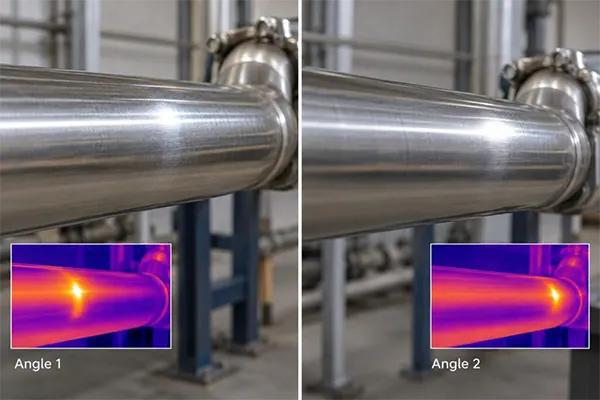
Only a few pixels can be covered by viewing a small component. Its displayed value can then blend with the cooler or warmer background around it. Only when it is safe and the target remains in focus. Moving closer can help. Open electrical panels or moving vehicle parts just to improve an image. Do not lean into hot machinery.
This is another reason to use a thermal image as a screening tool. It can show that a connector, vent, or chip area deserves a better test. It may not be the right tool to measure that small component precisely.
X-ray vision can’t be provided by Thermal imaging: A cool patch might be caused by air movement, shade, moisture, insulation, or the construction materials themselves. A warm area on a painted wall might reflect a pipe behind it, but the camera sees the paint surface.
The same rule applies to devices. A warm laptop case suggests that heat is reaching that surface. It cannot tell you which component inside created it, whether the component is failing, or whether that temperature is abnormal for the workload. Internal sensors, diagnostic software, and manufacturer guidance answer different parts of the problem.
Compare matching vehicle wheels after the same drive, two similar charging adapters under similar load, or the same PC at idle and during a known task. Keep the distance, angle, scale, and operating conditions as consistent as you reasonably can. Then write down what changed.
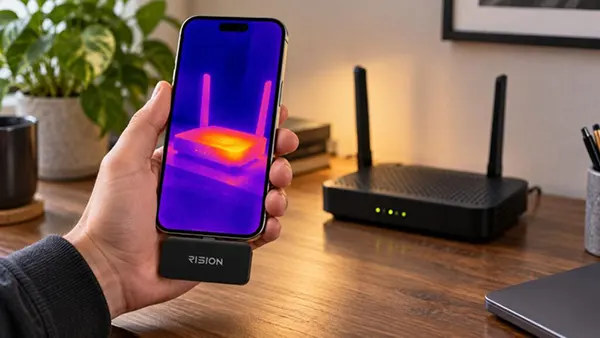
The app used with a device such as the Rision Thermal Camera for Smartphone can support that process with image capture and measurement controls. Its AI dual-light fusion pairs thermal data with visible detail from the connected device’s camera, helping you place a hot spot on the object you are checking. Check the current product details for the available functions and compatibility before relying on a particular workflow.
A thermal image can guide the next question, but the situation depends on the confirming tool. a moisture meter and visual inspection for a suspected damp area, and appropriate electrical testing for a connection that appears unusually warm. Use internal temperature sensors like these for a PC. Compare service information and have a qualified technician perform the relevant mechanical or electrical checks for any vehicle concern.
There is an important safety boundary. Smoke, a burning smell, damaged wiring, sparking, active water intrusion, or damaged high-voltage equipment are not DIY diagnostic puzzles. Step back and seek qualified help.
The most dramatic one is not necessarily the most useful thermal image. The one that has you say, “This part behaves differently from its match under these conditions—what should I test now?” Read the scale, consider the surface, rule out reflections, and compare fairly before calling a pattern a fault.
Thermal imaging is a technique used to produce images of the infrared energy emitted from objects in order to detect specific areas of abnormally high temperatures. It identifies problems with electrical, mechanical, or other systems inside your home.
No, Thermal imaging cameras do not see through surfaces but detect surface temperatures. If a wall is thick enough to trap the heat on one side without leaking it into the other side, then thermal imaging will not detect it.
No, the thermal imager does not emit any form of radiation. It’s a sensor that records infrared radiation and processes it for human use.