You can easily set up voicemail on your Android device with the help of the built-in feature on your device. Voicemail helps the caller leave a voice message if you are unavailable or cannot answer the call. The steps can be different depending on your device brand and version.
There are 2 methods to set up your voicemail: one is from the app menu, or the keypad shortcut to access your voicemail settings. Let’s see the step-by-step guide for how to set up voicemail Android.
You can easily set up voicemail on your Android device with the Phone app menu. The Phone app menu allows you to set up voicemail by following the easy steps mentioned below:
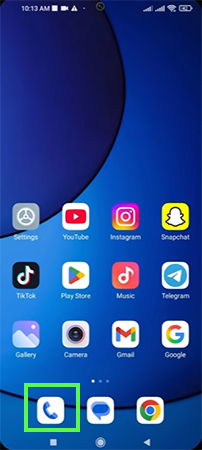
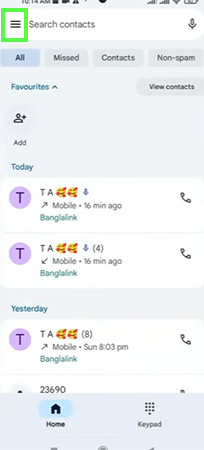
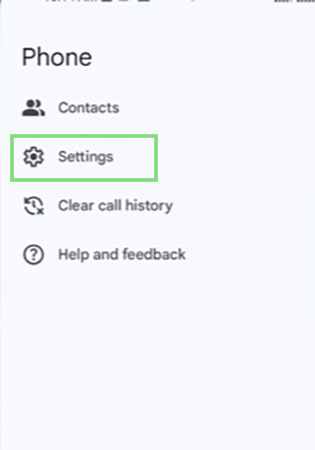
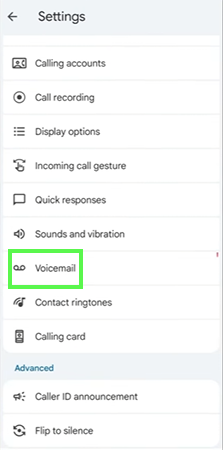
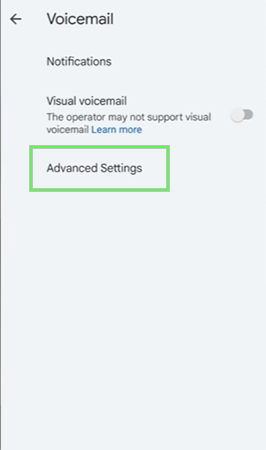
Some devices have a security PIN feature.
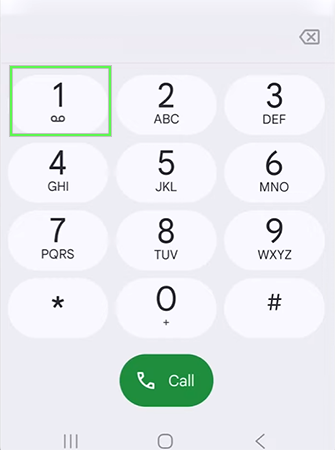
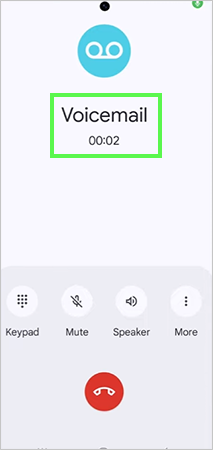
You can easily set up voicemail on your Android device with the help of the keypad shortcut. In this method, you can easily set up your voicemail because the keypad directly connects you to voicemail. You can easily reset the voicemail by clearing the cache on Android.
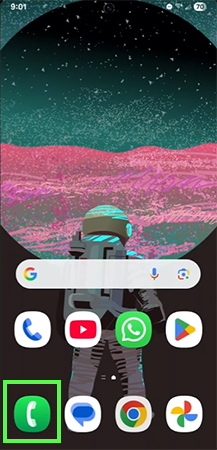
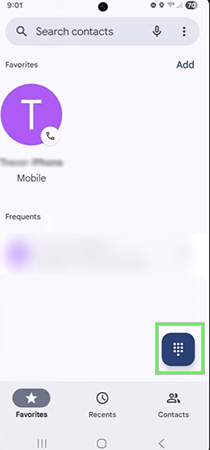
Some devices have a security PIN feature.
Voicemail helps the calling person leave a voice message if you are unavailable or cannot answer the call. Using a keypad is the easiest method to set up voicemail.
It will help the caller to record the voice message for you. In this guide, we will show you how to set up voicemail on an Android phone using two simple methods. If this guide is helpful, you can check out more such guide videos on the Getassist YouTube channel.
There are two different methods to set up your voicemail on an Android device; each method takes around 10 minutes.
The Android device comes with a built-in feature to set up voicemail. There are 2 different methods: using the Phone App Menu and the Keypad Shortcut.
Press and hold the Phone app, tap on App info, then clear the cache.
Open the Phone app, then tap on Keypad and press and hold 1.
No, voicemail doesn’t have unlimited storage on Android; you can only save 20 to 40 voice messages at a time.