Colors and their depth play a very crucial role in our everyday visual experience on digital appliances, which is why high-caliber displays made in 2K resolution are so relevant nowadays.
From monitors to cinematic screens, this format is ruling everywhere and has appealed to the masses in this very decade, but what makes it so special? Well, don’t worry because we are going to answer this question in detail through this GetAssist article.
2K is a display format that denotes it is made up of 2000 horizontal pixels in its architecture and carries high density and proximity. In more technical terms, its calibration is built on 2048 × 1080 pixels, which ensures the minimum criteria of a 2K resolution. The perfect aspect ratio that brings the highest color range and intensity is 16:9.
Although there are several variations of the 2K display, which are tweaked to make it compatible with different screen sizes, which we are going to explore in the next phase, in most cases, 2K with a 2560 × 1600p structure and an aspect ratio of 16:10 is the most commercialized.
The 2K resolution size has the capacity to become flexible for various formats and different aspect ratios to fit in different categories, like monitors and televisions. It can also be used in premium wearables like smartwatches to improve overall UI. Let’s see how it’s embedded in each format.
However, if you want deeper insights about these displays, their calibration, and the next big things coming to this segment, then subscribe to the GetAssist YouTube channel, along with pressing the bell icon.
Displays and their attributes play a vital role across the tech domain, as their qualities can provide several benefits, such as affordability, high refresh rates, Pantone-validated colors, etc.
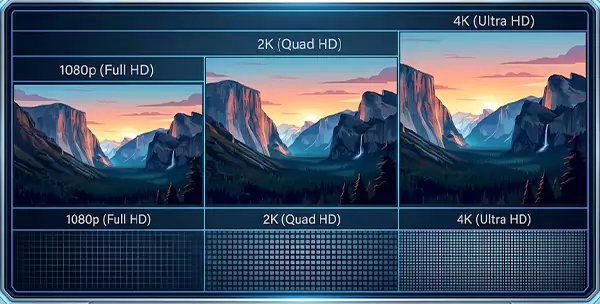
But some viewing technologies lack these features, while for others it’s a specialty; that’s why we created a detailed comparison chart between 2K, 4K, and 1080p.
| Basis | 2K | 4K | 1080p |
| Resolution and Display Quality | 2K has a great resolution of 2048×1080, and it is popularly called QHD (Quad High Definition). | 4K has a higher resolution of 4096×2160 and is considered Ultra High Definition (UHD). | 1080p has comparatively the lowest resolution of 1920×1080, which is also called “full high definition” (FHD). |
| Panel Combination and Support | It supports panel types like TN, VA, and IPS. | 4K can also be aligned with panels like TN, VA, and IPS, which we are also seeing in the latest products like iMac Pro i7 4K. | 1080p is also compatible with panels like TN, VA, and IPS. |
| Availability and Preference in Commercial Domains | 2K displays are the ideal choice for entry-level premium gamers, streamers, and people looking for a good television experience. | 4K is the supreme choice in the market when it comes to luxurious Smart TV screens and gaming monitors. | Unlike 2K and 4K, 1080p is built to cater to a budget audience with decent color tone and high refresh rate experiences. |
2K resolution might not be paramount in the visual segment due to the arrival of 4K and even 8K standards (which are practically useless in most cases but have a slightly better color tone), but it has some insane capability to provide a crisp and colorful viewing experience to the users.
As it brings the perfect experience of 1440p, people are more attracted towards it when they look for a good entry-level premium display, which is better than 1080p (FHD). 2K resolution size is ideal for gaming and other entertainment purposes, which is why it is dominant in commercial markets.
The paramount factors to consider for a 2K display are its calibration of pixel placements, which has 2000 horizontal ones, and the density of 2560 x 1440p, along with the aspect ratio of 16:9.
Yes, for products like monitors, the 27inches is ideal for the fabrication of 2K resolution displays, as they can seamlessly produce colors and add depth in blacks.
Yes, a human eye can see 1440p resolution and spot the difference between other lower-grade formats due to its high punchy color tone and sharp brightness.