iPhones come with the built-in feature of location services, and it is very helpful for many applications. It helps you find your device with the Find My feature on your iPhone.
But when location is always on, it may drain your device’s battery, and some unwanted applications may access your location. These are the reasons why turning off location on iPhone is necessary.
Follow this guide and learn how to turn off location on iPhone.
You can easily turn off location on iPhone for the whole device. After turning it off, Maps and Find My do not work properly.
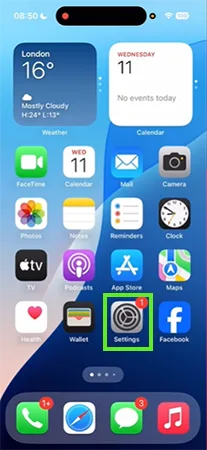
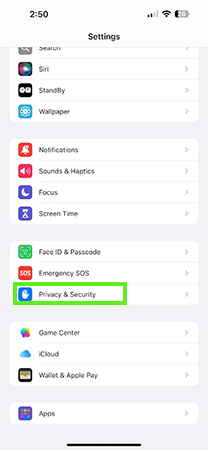
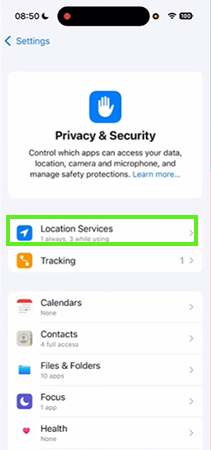
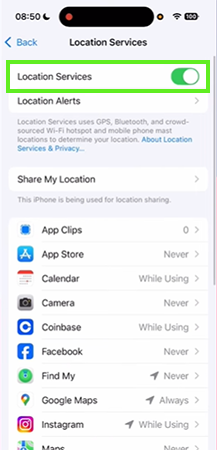
Turning off location for a single application is a better option compared to turning off location services because it helps you use Maps and Find My properly.
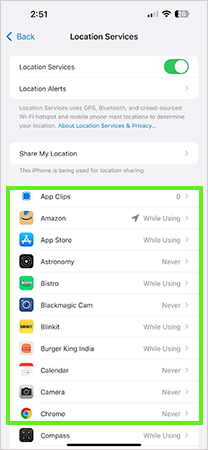
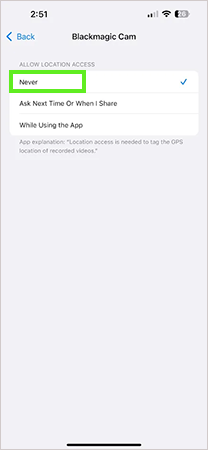
Location services are a built-in and useful feature on iPhone. You can turn off location services on your device, or you can disable location access for individual apps. If this guide is helpful, you can check out more such guide videos on the Getassist YouTube channel.
Go to Settings and in Security, tap Turn Off Location Services. You can also disable location access for individual apps.
Go to Settings, then Privacy, and in Location Services, toggle off Location Services.
Yes, someone can secretly access your location without any notification or pop-up.
Yes, you can track your wife’s location if she shares it with you through Find My on iPhone.
Generally, a phone number is not enough to track someone’s live location.