Share focus status means letting the people who message you know that your notifications are turned off and you are using focus mode. When you open focus mode and someone messages you, it tells them that your focus mode is on and you might not answer right away.
The best feature of this is that it doesn’t highlight which focus mode you are using, like sleep or work. It only notifies them that your alerts are off.
If you are busy doing something important, you can use this mode to avoid getting disturbed and simultaneously tell the person trying to reach you that you are busy while keeping your exact activity and the mode you are using private.
Let’s learn how to use this mode by going through this article.
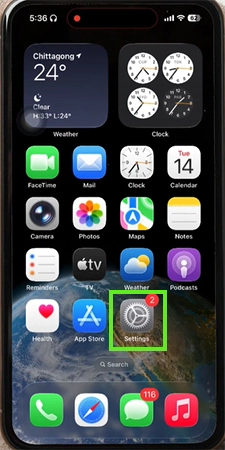
The steps to turn on Share Focus status are:
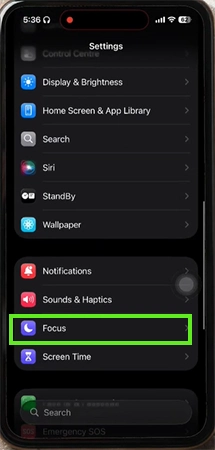
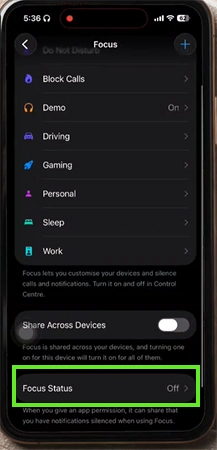
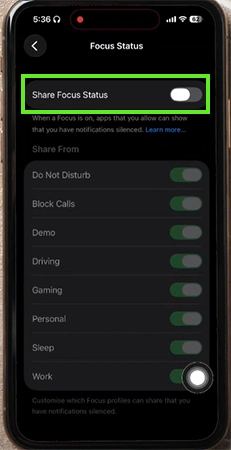
This feature can be really helpful for people who don’t want to get disturbed and bothered. If you also don’t want to talk to someone about your troubleshooting problem, then you can visit the GetAssist YouTube channel to get solutions to your problems without getting bothered by anyone.
When you use the feature of Share Focus Status on your device and someone messages you, they see a small note saying that you have turned your notifications off. It doesn’t tell them which mode you are using but somewhat changes the way you receive the messages on your device.
Now let’s look at the pros and cons of using Share Focus Status
The Share Focus Status feature can help you in establishing a digital boundary by informing your contacts that notifications are muted.
This can really help you get some space for yourself without someone disturbing you by continuously calling and messaging you, while still providing an emergency contact button to them.
Ans: Yes, you definitely can. You can enable or disable sharing individually for profiles like Do Not Disturb, work, or whatever the reason is.
Ans: Yes, if your contact has Share Focus Mode turned on, you can message him, and if the notification on your iMessage doesn’t show up saying, “Your contact has notifications silenced,” then you are most probably blocked.
Ans: No, when an Apple user turns Share Focus Mode on, it can only be seen and notified by Apple users.