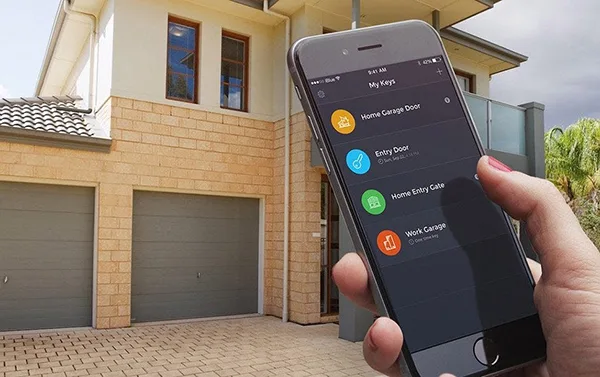
A smart garage door opener helps you check the status of your garage door from your phone, close your garage door from your office, and receive a notification when someone opens your garage door while you are away.
Sometimes apps may show some glitches or problems, but the important thing is most problems with smart openers aren’t caused by the motor or the door. They might arise because of Wi-Fi, a weak sensor battery, an app setting, or a safety feature doing its job.
The routes are of two types. Try to find out which one you’re on before you start.
The sensor tells the hub whether the door is open or closed, and the hub then speaks to the opener and your home network. A retrofit kit is the cheapest option.
If you are thinking of buying a kit, check its compatibility list against your opener’s brand, model, and age.
Sometimes the real screens used by the individual brands differ, but the sequence often follows the same order.
A sturdy step ladder is actually what you need to reach a hub or opener mounted up high. Try to place your hands away from the opener rail and the moving door.
Sometimes you hear a beeping sound a few seconds before the door actually moves when you close the door from the app. It’s not a bug, but a safety feature that alerts anyone in the garage that the door is about to come down, because the person using the app can’t see it.
Leave everything for a technician, which needs you to open the opener housing or work with its wires, or that involves the drive gear inside the motor unit
Here are some common problems and the fixes you should try first:
Many garages are built at the far end of the house, with a metal door and concrete walls between the opener and the wireless router, and that alone can knock the connection out.
Reboot your router, unplug the opener for a minute or so, then plug it back in and see if it connects. If you are thinking of changing your router or Wi-Fi password, the opener still remembers it.
Adding a mesh point or Wi-Fi extender near the garage might also solve the issue once and for all.
When the door is creating problems during closing, check the safety sensor first. If an object is blocking the safety beam, or a sensor is out of alignment or covered with dust, the door will not close, and the opener’s light may begin to flash to alert you of a problem.
Remove if there are any obstructions, clean the sensor’s lenses with a soft cloth, and check that both lights are steady. Never tape over the sensors or bypass them. They are there to prevent the door from closing on a child, a pet, or a car.
This shows the door sensor, which is powered by a small battery. If the battery is weak, the status can take a long time to update. Replace the battery. Ensure that the sensor is firmly stuck to the top of the door. If it has come loose, it won’t be able to tell whether the door is tilted or not.
When the handheld remote and the keypad have stopped working, check the wall control for a lock or vacation mode. Sometimes when it’s on, the opener ignores every wireless command, but the wall button still works. Switch the lock off and test again.
If the handheld remote is the only thing that has stopped, it may just need to be paired again. This guide on how to reset a garage door opener walks through clearing the old codes and pairing your remote, one step at a time.
Also do check the notification setting and phone setting for that app. It’s possible that the phone might be in battery saver mode and stop the app from sending notifications while it’s running in the background. Check if you are logged in with the account the opener belongs to. It might be possible that sometimes the opener gets split between two logins in shared households.
An expired account link will result in a smart speaker or home assistant losing control of your door from time to time. Try to unlink and relink the opener in the assistant’s app. Many brands need a PIN to open a door by voice command, and that setting is worth leaving on.
A smart opener adds convenience to your life with no new rules. It’s the simple habits that will keep you safe that are:
Try to check the door now and then, not just the app. A gap in the torsion spring above the door means the spring has broken, and the opener shouldn’t be run until it’s replaced. A technician should handle the spring and cable, not a homeowner.
Sometimes you think that an issue might arise because of an app, but they are actually a problem with the opener or the door. For instance, when the wall button has no effect, or if the opener hums and strains while the garage door hardly moves, the issue is with the opener or the door. But a garage door that does not open evenly, is louder than before, or hangs lower on one side is also a problem with the opener or the door.
App updates don’t fix those sorts of problems. Stop running the opener and get a trained professional to check the door and the opener together. If you need someone sent out to check both, Century Garage Door Repair Service can send a technician.
Typical reasons for not connecting are a weak signal in the garage, a 5 GHz-only network, or that the network name or password has changed. Check the signal in the garage, switch to a 2.4 GHz network, and reconnect the opener in the app.
Often, yes. A retrofit kit with a central unit and a door contact sensor is compatible with many garage openers. First, check the kit’s list of compatible products against the brand and model of your garage opener.
It’s a safety feature. When a user closes a door via the app, they may not be able to see it. Therefore, the opener will flash and beep before the door closes, so anyone nearby can get clear.
Yes, as long as the safety sensors and the auto-reverse work, so test them once a month. Any parts like springs, cables, and interior parts of the opener must be maintained and repaired by a qualified technician.