Who does not know about the advanced privacy and security features of the iPhone? Even this is one of the major reasons why professionals prefer using Apple. But here is a fact – simply owning an iPhone won’t make a major difference. The real benefits comes handy when the settings are truly aligned in the same way.
Every year, settings evolve, updates arrive, and even the cyber attacks become stronger. Knowingly or unknowingly, our phones leak our data, including sensitive information, without our permission. But the good news is that this can be stopped with some smart practices.
But how? Read this post to tune up privacy settings for iOS in 2026 and enhance your privacy.
Key Takeaways
- App tracking transparency allows a user to actively limit advertising tracking, but does not stop every form of data collection.
- Reviewing the camera, microphone and other permissions of the phone allows one to lower the data exposure.
- Using public Wi-Fi can expose one to various unsafe sites even when the privacy settings are enabled.
Before we stare at the data that’s exiting your device, we need to clean up the backyard. Apple gives you helpful tools to control what selfish app developers can pull from your hardware, but many of the best security measures are turned off by default setting. Open your Settings app and let’s go for them.
There’s a system called App Tracking Transparency (ATT). While it’s not a magic armor (more on that in a moment), you surely need it active to throw a screw into the advertising observation machine.
To check it, go to Settings > Privacy & Security > Tracking. Then, look at the top toggle: Allow Apps to Request to Track. If this is turned on, apps will keep pushing you with pop-ups. By changing this switch off, iOS automatically limits permission to every single app before it even has a need to ask. It blocks off access to your IDFA (Identifier for Advertisers) at the root.
Apps don’t need to know your current address to tell you the local weather, and websites don’t need to watch you across the internet like a digital stalker.
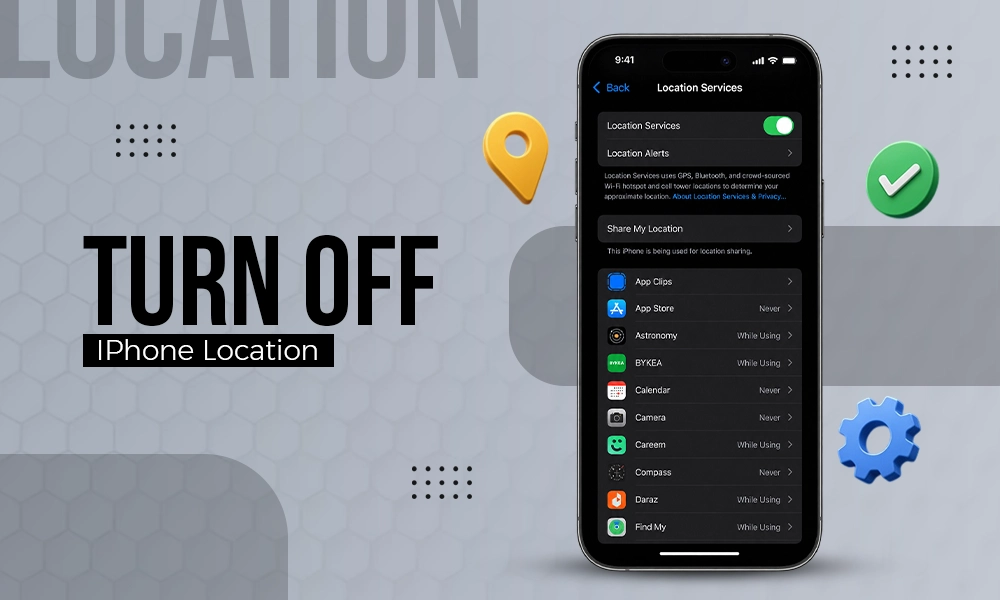
First, let’s fix your location. Go to Settings > Privacy & Security > Location Services. You’ll see a list of everything that has been tracking your travels. Set any app that doesn’t strictly include live GPS to While Using the App or Never.
Then, tap into individual apps like food delivery or weather. You will see a button for Correct Location. Turn it off. This causes the app to only see an exact radius. They’ll still know you are in Chicago, but they won’t know your current couch cushion.
The latest iPhones have a feature called Limit Precise Location. Go to Settings > Cellular > Cellular Data Options, tap your line, and turn it on. It adds a mathematical haze to the location data your cellular network broadcast tower grabs, halting cellular providers from crafting an exact map of your daily travels.
Go to Settings > Safari. Scroll down to the Privacy & Security tab and ensure these three toggles are green:
The simple fact is that apps are lazy. They ask for full entry to your hardware during setup, desiring you’ll just tap “OK” to get past the screen.
Go to Settings > Privacy & Security. Tap through Camera, Microphone, and Local Network. Ask yourself why a single-player puzzle game seeks to scan your local home network or access your microphone. If it does not make sense, reverse it.
If an app stops operating because you turned off a permission it does not actually need, that app is a mining tool masked as software. Delete it.
While you’re at it, scroll down to the bottom of the Privacy & Security menu and turn on the App Privacy Report. It does not block any data on its own, but it keeps a 7-day log of just when and how often apps use your permissions and which third-party domains they are talking to at 3:00 AM.
Finally, fix your email. Go to Settings > Apps > Mail > Privacy Protection. Turn on Protect Mail Activity.
Newsletter writers love to insert invisible, single-pixel images inside emails. The time you open the message, that pixel comes forth from their server, stating the sender exactly when you opened it, what device you used, and your current location via your IP address. This mode routes that traffic through remote servers to disable those tracking pixels fully.
Take an extra 30 seconds to go to Settings > Face ID & Passcode and turn on Lost Device Protection. If an online thief gets your phone and knows your passcode, this setting implies a compulsory one-hour delay and biometric scans before anyone can change your Apple ID password or security controls. It’s a smart technique that stops physical attackers from blocking you out of your own digital life.
Now that you have spent a few minutes modifying controls, your iPhone is much safer than it was. But this is where the corporate brochure ends and the actual check shows up.
If you think you’re totally alone now, you’ve tuned in for the industry’s favorite myth. Apple’s privacy settings are good, but they’re strictly limited. They stop at the physical borders of your glass screen.
When you tap “Ask App Not to Track,” you’re regulating an honor system. You’re asking iOS to hide your device’s unique advertising ID (the IDFA) from that app.
Here’s the important aspect: ATT does literally nothing to stop network-level visibility. It cannot control what your Internet Service Provider (ISP), your mobile carrier, or the operator of the local coffee shop Wi-Fi network can see.
In addition, independent research has consistently shown that system-level identifiers exist. Even with ATT turned purely off, your iPhone routinely exchanges telemetry data, device models, serial numbers, and software versions upfront with servers. The device isn’t falsely advertising its security, but it’s deeply flawed.
Every time your iPhone surfs to a website or updates an app in the background, it has to send a request through your live network.
If you’re waiting in an airport, a hotel, or a cafe using their free Wi-Fi, the network operator can see every single domain endpoint your iPhone reaches. They might not see what you’re typing inside an encrypted banking app, but they obviously know you just opened your banking app, checked Reddit, and used a medical portal.
They can log this data, relate it to your device’s network card (MAC address), and use your IP address as a reliable tracker to follow your location across town as you jump from network to network. No on-device menu option in iOS changes this.
Some users look up iCloud Private Relay and think the problem is solved. It isn’t.
Private Relay is a dual-hop proxy system that only guards traffic inside the default Safari browser, and it needs a paid iCloud+ subscription to use.
If you use the Google Chrome app, the YouTube app, your Spotify app, or any of the hundreds of other services on your phone, Private Relay left that traffic completely vulnerable to the network operator. It is a custom feature, not a system-wide cover.
To fix a network-level flaw, you have to cover the connection itself. This is where VPN for iPhone enters the scene.
A VPN isn’t a secret button that makes you completely private across the web, and it doesn’t mimic the on-device steps we just took. If you log into your personal Google account while connected to a VPN, Google still figures out exactly who you are.
Instead, a VPN like Windscribe for iPhone offers one unique, lively purpose: it verifies the network path between your iPhone and the rest of the web. When you access a VPN on your iPhone, it packs your data in an encrypted pipe using industry rules like AES-256 or ChaCha20.
When your phone issues a data request, the local Wi-Fi router or your cellular carrier cannot see the address. All they see is chaotic jargon aimed toward a secure VPN server. The cafe network admin cannot log your habits, your ISP cannot assess your data patterns, and trackers cannot use your real IP address to verify your physical location.
To make this useful for daily life, look for a mode called On-Demand or per-Wi-Fi auto-connect inside your app.
You can setup the software to stay completely inactive while you are on your certified home Wi-Fi network, but the only second your iPhone connects to an unencrypted public network at a coffee shop or airport. Here, the encrypted tunnel snaps open rapidly before a single byte of data slips out.
You have to choose your toolkit wisely here.
The App Store is loaded with hundreds of free VPN apps. Running a faulty, unverified free VPN is actually more serious than using no VPN at all. If a service doesn’t cost you a fee, they’re making their money somewhere else, usually by taking your network logs and passing them to the exact data brokers you’re trying to block.
Look for firms that back up their rumors with independent security reviews, use open-source applications, and behave under tough, proven no-logs policies like windscribe.
An iPhone is undoubtedly one of the most privacy related smartphone available in today’s time. But the fact is that privacy is not something that comes by default. It is like a train that needs to be brought onto the track for a right motion. In the same way, some settings and updates need to be aligned to get the right benefits of the improved privacy.
Just a few minutes used to check permissions, location settings and given access to apps – one can truly reduce the amount of data shared through the device. Making these small but effective adjustments today can save you from various future problems.
No. ATT only stops apps from using your device’s advertising identifier (IDFA) to track you across other companies’ apps and websites. It does not stop apps from saving data you give them on their own.
Out of the box, iOS is cleaner than its competitors, but it is not completely safe. Apple sets many simple features to switch out rather than opt in, meaning your location, cross-site tracking data, and background app analytics are actively used until you manually dip into the settings menus to turn them off.
If you only use your iPhone on your reliable, secure home network, a VPN is an optional layer. However, if you routinely connect to public Wi-Fi networks at hotels, airports, cafes, or offices, a VPN is ideal to close the network transparency gap that your on-device iOS controls cannot cover.
No. iCloud Private Relay is a proxy system that only secures traffic passing through the native Safari browser for paid iCloud+ users. It leaves all other background network traffic, app data, and alternative browsers (like Chrome or Firefox) completely disclosed to the local network supplier.
Unless your connection is secured by a system-wide VPN, any network you join can log the exact domain names and sites your iPhone reaches, along with the timing of your activity and your device’s unique hardware signatures.