“Security is a process, not a product.” – Bruce Schneier (Security Expert)
That idea matters on smartphones because security isn’t something you achieve simply by setting a strong password and moving on.
Your smartphone is probably the most personal computer you own, but the phone itself is often the least valuable part of the device. What matters is everything that has gradually collected inside it.
But the slow accumulation changes the way we should think about smartphone security. The good news is that protecting a smartphone doesn’t require becoming a cybersecurity expert.
What counts is everything that has gradually collected inside it. Banking apps. Medical records. Family photos. Password reset emails. Digital boarding passes. Tax documents. Work chats. Years of messages that nobody planned to keep but never deleted either.
None of that arrived overnight. It happened one download at a time. One new account. One payment app. One cloud backup. A few permissions accepted without much thought because saying “Allow” was quicker than stopping to read the prompt.
That sluggish accumulation changes the conversation about smartphone security. The question is no longer whether someone can unlock your phone. It’s how much of your personal life continues moving through it every single day and how much of that movement still matches the choices you would make today.
Most people clean out old photos before they run out of storage. Far fewer do the same with applications.
A phone that feels tidy on the home screen can still be carrying years of old decisions in the background. Applications that were downloaded for one holiday, one event or one project may still have permission to read your location. Shopping apps you barely remember installing can remain signed in. Services you stopped using long ago sometimes continue syncing quietly because nothing ever told them to stop.
None of this is surprising enough to attract attention. That’s probably why it stays exactly as it is.
Now and then it’s worth scrolling through the apps you already have instead of searching for new ones. Removing access that no longer makes sense is often more useful than adding another security feature.
People tend to remember the moment they discover something is wrong. An unfamiliar login alert. A payment they didn’t authorize. An account that suddenly declines to accept the correct password.
The decision that made those things possible usually happened much earlier. It may have been a website that looked convincing enough to trust. An app that asked for broader permissions than it really needed. A message that arrived while you were distracted and seemed ordinary enough to open without thinking twice.
Looking back, those moments don’t feel remarkable. That’s exactly what makes them so easy to miss.
Most security incidents are built from small choices that never looked like security decisions when they were made.
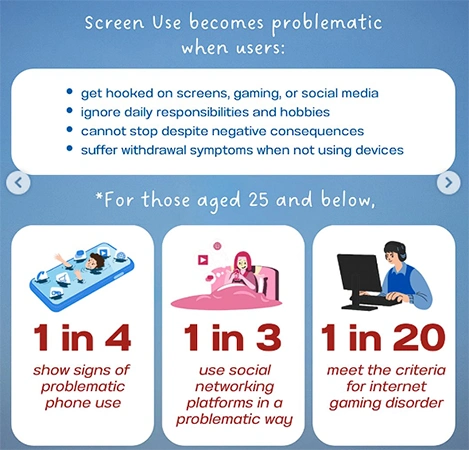
The infographic lists some facts and signs of problematic digital habits:
Alt: Problematic Digital Habits
People often expect better security to involve complicated settings or specialist knowledge. Most of the time it doesn’t.
The habits that make the biggest difference are the ones that gradually become part of using the phone itself.
A few examples are worth keeping in mind:
The most useful online safety tips don’t begin after something goes wrong. They shape the hundreds of everyday decisions that happen before a problem has the chance to appear. That’s what makes them easy to ignore, but it’s also what makes them so effective over time.
Open the WiFi settings on a phone that’s been used for three or four years. There’s a good chance you’ll find networks from hotels, airports, cafés, university buildings, vacation rentals and offices you haven’t visited in ages. Most of them connected automatically at some point because that was the convenient thing to do.
The same pattern appears elsewhere. Bluetooth devices that haven’t been switched on for years. Browser sessions that still recognize old shopping sites. Apps you downloaded for a concert ticket, a food delivery or a parking meter, then never opened again.
None of those items automatically creates a security problem. They simply illustrate how a smartphone keeps collecting history. Every now and then it’s worth clearing out more than photos and downloads. Forgotten connections, old permissions and abandoned accounts deserve the same attention because they continue existing long after their original purpose has disappeared.
People usually imagine stolen data as something dramatic. A hacker breaks into a device. Malware copies private files. Everything happens without permission. Much more information leaves a smartphone because permission has already been given.
A weather app checks your location. A retailer stores your purchase history. A navigation app remembers where you parked. A food delivery service knows your home and work addresses because you’ve entered them dozens of times before.
Each service gathers information for a perfectly reasonable purpose. The bigger picture only becomes visible when all those pieces are viewed together. A modern smartphone doesn’t usually reveal your life through one application. It reveals it little by little across dozens of ordinary services that each know something different about you.
That is why many online safety tips focus on limiting unnecessary data sharing rather than treating every app as suspicious. Sharing information is often unavoidable. Transmitting more than necessary usually isn’t.
Most people don’t schedule a “security check.” They replace a cracked screen, clear storage, or install a software update because the phone reminds them to do it. Privacy settings rarely get the same attention.
A quick review doesn’t need to be technical. These questions usually tell you whether anything deserves another look:
None of those inspections take very long. Most of the time nothing needs to change. Occasionally one forgotten permission or an old application stands out immediately, making the review worthwhile.
People sometimes expect stronger security to come with extra effort. In reality, the opposite is often true.
Once a phone has been cleaned up, unnecessary apps removed, permissions reviewed, and accounts checked, there isn’t much to think about from one day to the next. The device works exactly as before. Messages arrive. Photos sync. Banking apps open normally.
The difference is mostly invisible. Less information is being shared simply because it doesn’t need to be. Fewer old apps continue collecting data in the background. Important accounts are easier to recover if something unexpected happens.
That’s likely the most reassuring part of smartphone security. When it’s done well, it rarely changes how the phone feels to use. It simply reduces the number of surprises waiting in the background months or years later.
Start with the basics: use a strong screen lock, keep the operating system and apps updated, enable two-factor authentication on important accounts, review app permissions, and remove apps you no longer use.
Apps generally require permission to access sensitive information such as your location, camera, microphone, contacts, or photos, and permissions can remain enabled long after you stop needing an app.
Public Wi-Fi isn’t automatically unsafe, but unsecured or poorly protected networks can increase the risk of certain attacks.