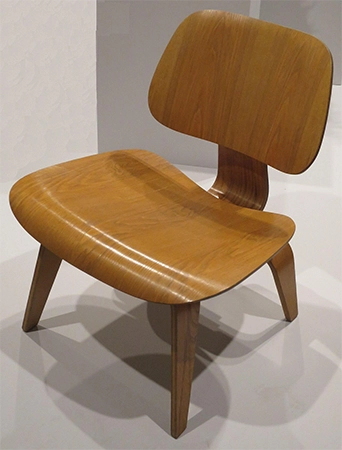
Secondhand chairs do not come with 3D models, but what if you need the model? A box works until somebody has to judge whether a curved back clears a windowsill; at this point, it is worse than nothing.
A photograph is a better way, and one JPEG from a phone can run through a converter. Come back as a SketchUp component with the chair’s real curve and the colour of its wood. Let’s see how to turn up a JPEG of a chair into a model.
The converter is exact about what it sees. The second attempt had a bookshelf behind the chair, and the model came back with the shelf edges combined into the backrest, so that the chair appeared to have grown a grate. Pulled out to a bare wall, the outline came through clean, and a bedsheet pinned up or a parkade door would have done the same job.
The first attempt had failed for a duller reason, which was that anyone who took it was standing up at the time. A chair attempt from above comes out with a seat that looks like a platter and back legs an inch or two too short, and the model copied both faults faithfully, as it will. Compacting until the phone was at seat height fixed the segment. Turning the chair so one front leg pointed at the lens gave the three-quarter view (front, one side, top, all in one frame) that the transformer builds from. Straight on, it has to guess the depth, and it isn’t good at guesswork.
Window light was enough, and the flash was kept off, because a hard shadow across a seat gets read as a surface mark in the seat. Leaving a hand’s width around the chair beat cropping tight, which had trimmed the legs on an earlier try. And the file went to the laptop by cable. Forward it through WhatsApp, and it reaches compressed to about 1,000 pixels on the long side, already too small for a transformer that wants 1,500 on the short one, and nobody tells you.
| Phone setting | iPhone | Android |
| Format | Most Compatible, so JPEG rather than HEIC | Highest JPEG size, RAW off |
| Lens | 1x, not the wide lens | 1x |
| HDR and Live Photo | Off | HDR off |
| Flash | Off | Off |
The cropped photo went into a JPEG to SKP converter in the software, and after a short wait the page showed the chair as a rotating preview, which is where the bad attempts announce themselves. Rotating the first attempt round showed a seat shaped like a segment and back legs a good two inches shorter than the front ones, obvious at a glimpse and fixable only with a new photo. The third attempt looked like the chair from every angle, so that one got downloaded.
| Stage | File | Size |
| Phone photo | IMG_4471.jpg, 3,024 by 4,032 px | 2.9 MB |
| Cropped with a margin | 2,110 by 3,380 px | 1.6 MB |
| Downloaded model | chair_4471.skp | 1.8 MB |
| SketchUp file, six chairs and a table | 2.4 MB | |
| Exported plan render, 1,920 px | 0.6 MB |
Two honest warnings about what comes down. It has no size yet, just the right shape, and a typed assessment in SketchUp sorts that in seconds. And the camera only saw two sides, so the rest was restored.
| Part of the chair | In the model |
| Front and the visible side | From the photo, colour and grain included |
| Hidden side | Mirror of the visible side |
| Back | Rebuilt from the outline, flat |
| Underside | Flat |
On a balanced chair in a room plan, none of that shows. A chair with a carved back would want a second photo from behind, altered on its own, though nobody planning a dining room has ever been annoyed.
The .skp opened in SketchUp Free through the folder icon and Import, and landed as one group at the beginning. (Pro does it through File, Import, with SketchUp Files as the type.) Anything from 2017 onward opens it, including Make 2017 and Go on an iPad. A desktop copy older than that won’t, and the unachieving fix is the free web version.
The expanding took longer to explain to the person watching than to do. With the chair group chosen and the Tape Measure active, two clicks across the front of the seat and 46cm typed in produced SketchUp’s question about rescaling the whole model, and saying yes scaled every measurement of the chair together, so that the total height came out at 84 cm, within a few millimetres of the tape on the real chair. Any single real dimension would have worked. The seat width is the one that is easiest to read with a tape and toughest to get wrong, which is the only reason it was chosen. A right-click, Make Element, a name, and a save, and the clock said nine minutes.
| Step | What was done |
| 1 | Select the chair group with one click |
| 2 | Press T for the Tape Measure |
| 3 | Click the left edge of the seat front, then the right edge |
| 4 | Type 46cm and press Enter |
| 5 | Answer Yes to resizing the whole model |
| 6 | Right-click the group, Make Component, save |
The armchair and the stool went the same way after that week, and the only thing worth any thought each time was which single measurement to measure before uploading, since another thing scales from it. Pick whatever a tape can’t get wrong.
| Piece | Measure this |
| Chair or armchair | Seat width |
| Sofa | Width, arm to arm |
| Table or coffee table | Length |
| Floor lamp, wardrobe, bookcase | Height |
A few things declined to convert, and finding out which ones cost three wasted uploads that this paragraph can save you. The table came through with its pinny guessed; a second photo from nasty fixed them. The sofa with loose cushions came back as one lump until somebody aligned the cushions for the photo. The glass table didn’t convert at all (the converter can’t see glass), so the frame went through on its own, and the glass got drawn as a rectangle afterwards. The luster was deserted after one try in favour of a 3D Warehouse model. Two chairs photographed together came back as one imaginary presence with five legs, and that was the end of the one-piece-per-photo discussion in this house.
Four messages occurred across the three pieces, and none of them was serious; however, each one has stopped somebody before.
| Message | What it means | Fix |
| Import failed | Not a 2017 or later .skp, usually a browser renamed the download | Download again |
| The file is from a newer version | Desktop SketchUp older than the file | Use the web version, or Save As an older version in Pro |
| Model is very large, continue? | A texture over 4,096 pixels came through | Continue, then purge unused materials |
| Nothing appears after import | Group placed far from the origin | Zoom Extents, Shift and Z |
Six copies of the element went around a 180 by 90 cm table in the plan, placed with Move, and the Ctrl key, and the approval from the seat backs to the wall measured 60 cm, which was the number the carpenter had asked for. The return trade from the plan scene with shadows on was small enough to send in a message, which is how it arrived at the carpenter’s that afternoon.
That is the whole point, and a grey box would have missed it. The box would have given the same 60 cm. It would not have shown that the twisted wood back curves out 4 cm past the seat, which is why the chairs ended up 4 cm additional from the wall than the box had suggested, and why the carpenter’s first drawing had to change before anything was cut.
One object in the frame, a plain wall behind it, the phone at the object’s middle height, a JPEG or PNG with 1,500 pixels or more on the short side and a perimeter around the edges, and one real dimension written down before the upload, since a model at the wrong scale is useless and the same model at the right scale is the whole job. Get those five right and the model is operational nine times out of ten. The tenth time, there will be a shadow across the seat or a ledge behind the chair, and the fix is the one that worked on the curved wood chair’s first two attempts, which is to take the photo again.
A straight-on or three-quarter angle photo of a single against a solid white or neutral background with soft, even lighting produces the cleanest mesh and texture.
Use the tape measure tool to measure a known part of the chair, type the correct real-world measurement and press Enter to resize the model group.
AI tools handle complex organic shapes quickly, whereas manual tracing may require using extensions or the Follow Me tool for items like rounded wooden legs or curved shell chairs. Play two handle complex.