Every 3D project begins with a starting point, but choosing the right one can shape the entire creative process. Whether you begin with text or an image depends on how much of your design is already defined.
Start with text when you have an idea but no fixed visual design. Choose an image when the shape, proportions, or style already exists in a sketch, photograph, or concept illustration.
Use the following comparison before preparing your input:
| Project situation | Better starting point | Main reason |
| You only have a written concept | Text | No visual reference is needed |
| You want several variations | Text | Descriptions leave more room for flexibility |
| You have an approved character design | Image | The silhouette and proportions already match |
| You want to recreate a visible subject | Image | The reference provides direct shape features |
| The object has important hidden details | Text plus additional references | One image cannot describe unseen sections |
| The visual direction is still unclear | Text first, then image | Broad exploration can happen before optimization |
The decision becomes easier when you separate two questions: “What do I want to preserve?” and “What am I still willing to change?”
Text works well during early ideation because it does not require the creator to settle on a single drawing first.
A developer might know that a game needs “a compact maintenance robot with six legs and a worn industrial finish” without knowing exactly how its body should be constructed. A product designer might want to explore several desk organisers inspired by folded metal. A storyteller may need a ceremonial object from a fictional culture.
In each case, the concept contains purpose, mood and a few visual characteristics, but many decisions remain open. Text input allows the system to interpret those gaps and provide a three-dimensional concept that the creator can evaluate.
With Meshy AI, creators can use a written description as the starting point for a textured 3D model. The output should be treated as an initial draft for review and refinement, not as an automatically finished production model.
Text is especially useful when speed of iteration matters more than matching one exact reference.
A good prompt describes the object rather than surrounding it with vague praise.
Words such as “amazing,” “beautiful” or “high quality” communicate little about the intended geometry. More useful descriptions identify the object’s form, construction, material and visual style.
A practical description can include:
For example, “a fantasy chest” leaves most decisions undefined. “A low, rectangular travelling chest made from dark wood, reinforced with four iron corner plates and a large circular lock” provides more structural detail.
Avoid packing several conflicting ideas into one prompt. If an object is described as minimalist, heavily decorated, futuristic and medieval at the same time, it becomes difficult to determine which direction takes priority.
Text describes an objective, but it does not define every contour.
Two people can read the same description and imagine different results. A generative system may also interpret proportions, construction or style differently from what the creator intended. This is useful for brainstorming but less suitable when a design has already been approved.
Text alone may also struggle to communicate:
The solution is not always a more detailed prompt. Sometimes the project has reached the point where visual reference material communicates more effectively.
An image is helpful when the project already has something that must be preserved.
A character concept contains decisions about body shape, clothing and equipment. A product photograph shows visible proportions and surface textures. An architectural sketch establishes major structures. Starting from these references can keep the generated model closer to an existing visual style.
However, an image only provides reliable information about what it actually displays. A front view may explain width but reveal little about depth. A dramatic three-quarter view may look appealing while hiding important elements.
Image-based creation is therefore most useful when the reference is well-defined, centred and minimally obstructed.
The strongest reference is not always the most attractive image. It is the one that represents the object most clearly.
Before using an image, check:
Concept art should avoid cutting off important features. Product photography should use consistent lighting where possible. If several views are available, keep their proportions and design details uniform.
A lifestyle photograph may provide excellent atmosphere but poor structural information. In that situation, use it as a secondary style reference rather than the only modelling source.
Four common project scenarios are listed as follows:
The team knows an enemy’s function but has not approved its appearance. Text is usually the better first step because several silhouettes and material directions can be explored before one concept becomes fixed.
Once the team chooses a style, it can create or commission clearer concept art for later refinement.
The character’s proportions, clothing and major features are already established. An image offers a better starting point because the goal is consistency rather than broad interpretation.
The model will still need checks for anatomy, hidden surfaces, mesh quality and animation requirements.
An image to 3D workflow can convert the photograph into a textured three-dimensional starting point. The seller should then inspect it with the physical product, paying particular attention to the back, underside and any parts hidden in the original image.
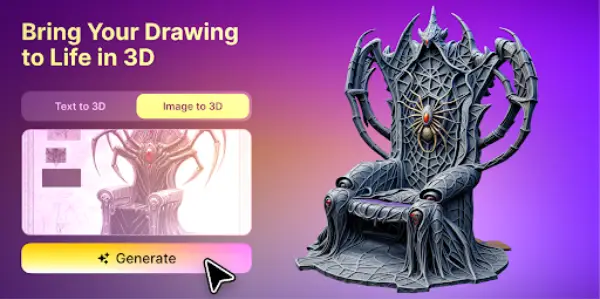
If accuracy matters, one photograph should not be treated as sufficient evidence of the entire object.
Text is useful for the first stage because there is no definitive visual reference. After choosing a promising concept, the creator can render or sketch that direction and use the image to support a more specific second round.
This combined workflow moves from open ideation toward tighter visual precision.
Yes. Text and image inputs can complement different stages rather than compete for the same task.
A creator might begin with text to compare explore concepts, choose one result, refine its design in two dimensions and then use that image as a more controlled reference. Alternatively, an existing image can be enhanced by written notes describing details that are unclear or absent.
Using both does not eliminate the need for evaluation. Generated models may still require work on:
The final production requirements should determine how much adjustment is necessary.
Choose text when you need flexibility. Choose an image when you need accuracy.
If you cannot clearly describe the object’s shape, create or collect visual references first. If you do not yet know what the object should look like, avoid committing the project to one image too early.
Most importantly, judge the starting method by the decision it helps you reach. A useful early model does not need to be perfect. It needs to demonstrate whether the idea is worth developing further.
The size, resolution, thickness, orientation and choice of material are all important elements of a creation dedicated to 3D printing.
Modern text to 3D model AI systems interpret natural language prompts and generate fully-realized 3D objects complete with geometrically sound mesh structures, physically accurate textures with proper UV mapping, multiple levels of detail, and clean topology compatible with traditional 3D software.
The average salary for a 3d artist is $84,511 per year in the United States. 122 salaries taken from job postings on Indeed in the past 36 months (updated July 3, 2026).
The era of waiting days for a render to finish is over. In 2026, the most resilient jobs are in Real-Time Pipelines using Unreal Engine.