It has been recently reported that federal agencies received about 193,407 phishing complaints in one year; an average of once every 2.7 minutes. This number represents only the people who actually filed complaints.
If you use Apple Pay, Google Wallet, Venmo, PayPal, or some other application linked to your bank account, you are exactly the type of person who cybercriminals want to cheat. Well, the good news is that rules for keeping yourself safe are not complicated; they are merely neglected. The guide below contains necessary practical information, so you do not become another victim of a scam.
Most beginners picture phishing as a badly spelled email from a Nigerian prince. The 2025 version is nothing like that. Attackers now clone the exact fonts, logos, and sender names of Apple, PayPal, Cash App, and your bank. The message looks right. The urgency feels real. And the link goes to a spoofed login page that harvests your credentials the moment you type them.
Three attack vectors dominate digital wallet phishing today:
According to the FBI’s 2024 Internet Crime Report, phishing and spoofing ranked as the single most reported cybercrime category that year, with Americans filing more complaints about it than any other type of online fraud. The scale of the problem is not abstract. It is the leading threat, by complaint volume, ahead of extortion and data breaches.
What makes digital wallets a particularly attractive target is speed. A fraudster who gains access to your Venmo or Cash App can move money in seconds, long before you notice the login. Email accounts can be recovered. A drained wallet balance is usually gone for good.
Picture this: Marcus is a freelance designer wrapping up work at 11 p.m. His phone buzzes. “Your PayPal account has been limited. Verify now to restore access.” There is a button. He is tired. He taps it, lands on what looks exactly like PayPal, logs in, and hands his credentials to a criminal sitting on another continent. His PayPal balance, $640, disappears in under four minutes.
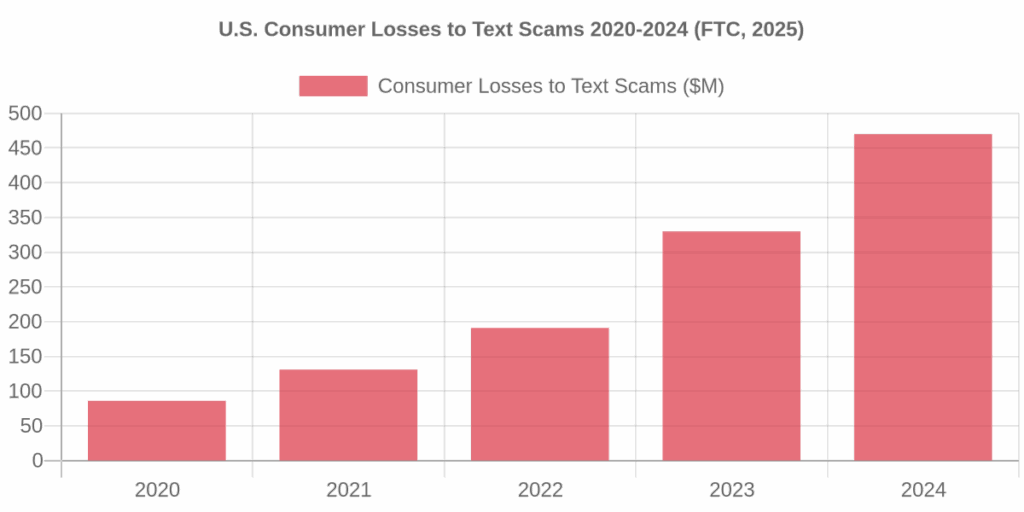
That scenario is not hypothetical. It plays out thousands of times every day across America. The Federal Trade Commission reported in April 2025 that consumers lost $470 million to text message scams in 2024, a figure five times higher than the losses reported in 2020. The number of reports actually fell during that period, which means each scam is pulling in more money. Scammers are getting better, not just more frequent.
The most common text-based wallet lures include fake package delivery alerts, fraudulent bank fraud warnings, and messages about “suspicious charges” on your payment account. All of them share one trait: they manufacture a reason to click right now, before you think.
One reason phishing works so well is that it bypasses deliberate thinking. The fix is to have a personal response protocol locked in before any suspicious message ever arrives. I call it PAUSE-VERIFY-REPORT, and it takes about thirty seconds per suspicious contact.
People who get blindsided by urgency scams are not gullible; they are human. Stress and distraction switch off your skepticism reflex. Professionals who need legal help fast, whether they are scrambling after an accident or searching for motorcycle accident lawyers in a panic, face the same cognitive pressure attackers exploit. The rule is simple: urgency created by a stranger in your inbox is always suspicious.
Security awareness training cuts phishing susceptibility by over 86% within a year, according to cybersecurity research. That number holds because behavior change, not just technology, is what blocks most phishing attempts at the personal level. Here are the five rules worth building into your daily habits.
| Rule | What It Stops | Effort Level |
|---|---|---|
| Enable hardware-key or app-based MFA on every payment account | Credential theft from phishing pages | One-time setup, 5 minutes |
| Never click links in unsolicited texts or emails | Smishing, email phishing, quishing | Zero effort, habit only |
| Set transaction alerts at the lowest available threshold ($1 or less) | Unauthorized micro-charges and account probing | One-time setup, 2 minutes |
| Use a dedicated email address only for payment accounts | Credential stuffing from data breaches | One-time setup, 10 minutes |
| Audit connected apps and third-party permissions quarterly | Stale app access that attackers can hijack | 15 minutes per quarter |
On multi-factor authentication specifically: not all MFA is equal. SMS-based one-time codes can be intercepted through SIM-swapping attacks. App-based codes (Google Authenticator, Authy) are stronger. Hardware security keys (YubiKey, for instance) are the most resistant option available to consumers today.
CISA, the U.S. Cybersecurity and Infrastructure Security Agency, formally identifies phishing-resistant multi-factor authentication as “the gold standard” for account protection and urges all organizations and individuals to treat migrating to it as a high-priority effort, noting that any form of MFA is better than no MFA.
The FBI’s IC3 2025 Annual Report recorded over $20.8 billion in total cybercrime losses, a 26% jump from 2024. That trajectory is not slowing down. Every rule above is a direct countermeasure to one or more of the attack types that contributed to those losses.
Train yourself to check four things before touching any link in an alleged payment notification:
Scan QR codes only from sources you physically verified yourself. A QR code stuck over a real one in a parking garage, restaurant, or store is a growing attack vector that bypasses every email filter you have.
Speed is everything. If you realize you entered credentials on a fake site, you have a narrow window to limit the damage.
Acting within the first hour dramatically increases your chances of recovering funds. Most platforms have fraud windows that expire. Know the process before you need it, not during the panic of realizing you have been hit.
Digital wallet phishing is not going away. The losses are climbing, the tactics are sharpening, and AI-generated fake messages are making everything harder to detect by eye. But the protection model stays simple: never trust urgency from a stranger, always verify through an independent route, and layer your account security so a stolen password alone cannot open the door. The criminals are counting on you skipping the basics. Do not give them the opening.
What is the fastest way to verify a suspicious text message?
Close the text and log into your account directly via the official app or website. Do not tap links or call numbers provided in the text.
Is SMS multi-factor authentication (MFA) safe?
SMS MFA is better than no protection, but it remains vulnerable to SIM-swapping and phishing. Use an app-based authenticator or hardware security key whenever possible.
Can I get my money back if I send it to a scammer via Venmo or Cash App?
Peer-to-peer transfers are usually instant and non-reversible. Contact your bank and the app’s support line immediately, though recovery is not guaranteed.