Exam preparation involves the need to manage lecture videos, long PDFs, notes, and helpful YouTube videos scattered throughout various mediums. The process of organizing all this data may end up taking longer than the study itself. TeraBox AI Notebook is meant to make things easier by merging several data forms into one workspace and converting them to learning materials.
It is no longer necessary to write down notes or switch from one document to another. It is much easier and more convenient to generate quizzes, flashcards, mind maps, notes, and even prepare presentation drafts with the help of this AI technology.
Today’s studying is an ordeal in that information never comes from a single book. The same exam topic could be spread over a lecture recording, a shared PDF file, a presentation, and a YouTube video.
Hopping between these different formats wears down your concentration before the actual studying even begins. During exam week, finding one diagram buried in a scanned PDF or a key point mentioned at minute 34 of a lecture video becomes a massive time sink. This “preparing to study” phase often takes longer than the actual learning.
The traditional notes application is a passive tool. It stores your files just like a digital filing cabinet; however, the analysis, organizing, and rewriting have to be done by yourself. An AI Notebook works more actively by processing your material through a simple workflow.
Understanding the Material
The first step is to examine the source material to determine the subject matter, important points, and general layout. Whether the input is a recorded lecture, a dense PDF, or pasted text, the system tries to understand what the material is about before turning it into a study format.
Breaking Down the Content
Next, it splits the material into smaller, more manageable parts. It can separate main concepts from supporting details, organize sections in a clearer order, and add timestamps when the source includes audio or video.
Generating Study Outputs
Finally, the program generates the desired output in the form of active study materials, such as summaries, quizzes, flashcards, mind-maps, or slides.
TeraBox AI Notebook does not require every source to be converted into a single file type before it can be processed. Users can easily insert multiple sources from different places and formats right into the workspace.
YouTube Videos
Simply paste a YouTube link. The tool processes the content directly—no downloading, converting, or external transcription required.
Cloud Documents
Import lecture slides or PDFs straight from your cloud storage, skipping the tedious download-and-re-upload cycle.
Audio, Video, & Text
Upload any video file recorded on your device, any voice notes, and even text copied from another source.
Bringing material into one place is only the first step. Its true value lies in what it enables you to create, and that is when the tool transcends its status as a note-taking app to become an actual AI learning tool.
From a single source, TeraBox AI Notebook can generate several types of study-ready outputs
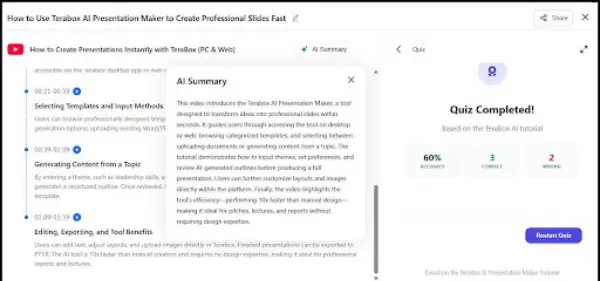
Most students re-read their notes before an exam and feel ready until the actual test. Re-reading creates familiarity, not recall. The act of reading makes students familiar, not retrieve. A quiz created from an imported file makes a student really retrieve information where memory is created. Make a mistake, and there will be instant feedback on the right answer.
Dense academic writing can make it hard to see the structure underneath the sentences. A mind map pulls that structure out visually, showing how the main ideas connect rather than presenting them as one long read.
For anyone who finds bulky paragraphs harder to absorb, this is a more useful starting point than scrolling through pages of text. It also helps before writing an essay or preparing a presentation, when seeing the shape of the content matters more than reading every word again.
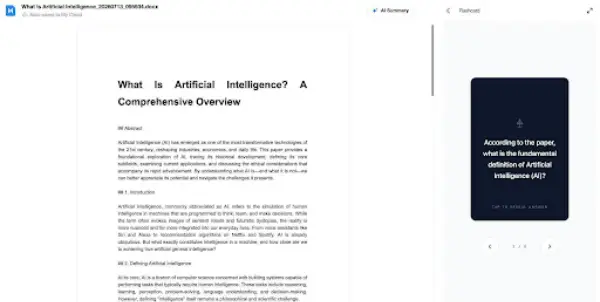
Great for vocab, formulas, or quick-fire definitions. The flashcards hide the answer until you click to reveal it. Spending 10 minutes flipping through these over a few days builds much stronger memory retention than trying to cram the night before.
This tool will be most helpful if there is already material prepared that has not been designed for the audience. AI slides use the existing material that has been uploaded and format it into a draft-ready presentation without the hassle of starting from scratch.
Students presenting research they have already done, or anyone converting a report into something visual, will get the most out of it. The output will likely need some refinement, but working from a draft is always faster than starting from nothing.
Now that we have explained what can be done with an AI Notebook, how can it be used practically when your time is limited?
To see how these features connect, let’s look at a common scenario: you have a 40-minute lecture video to review before tomorrow morning, and you do not have time to watch the whole thing from start to finish. Here is a faster workflow.
Step 1: Upload the Video
Drop the lecture straight into the notebook. No converting, no extra steps. It goes in as it is.
Step 2: Scan the Timestamps
A few minutes later, the lecture comes back broken into sections with timestamps. Scan through, find what actually matters for tomorrow, and jump straight there. Everything else can be skipped.
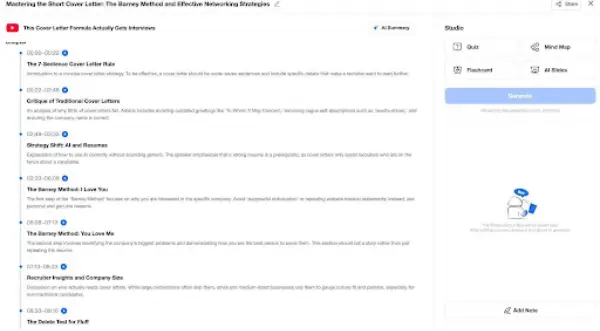
Step 3: Run a Quick Quiz
Generate a quiz from the same video. The questions come from the actual lecture content, so it is a real check on what has been retained, not a generic test. Wrong answers get corrected immediately, which makes it easy to spot the gaps.
Step 4: Finish with Flashcards
Use flashcards to cover whatever came up wrong in the quiz. A few short rounds of recall and the job is done. No re-watching, no long notes session.
Managing scattered study material across too many places can be a headache. Between open tabs, cloud folders, and lecture recordings sitting unwatched, the organizing ends up taking longer than the actual studying. Being an AI study tool, TeraBox AI Notebook combines all the materials into one place and transforms them into something truly useful. There are many more AI tools in TeraBox for you to explore!
TeraBox AI Notebook is an artificial intelligence-based study aid that summarizes the content from videos, PDFs, audio, and texts to make flashcards, summaries, quizzes, mind maps, and presentations.
The study tool accepts several types of sources for summarization, such as YouTube links, PDFs, cloud files, audio recordings, videos, and texts.
Yes. The service provides quizzes based on the basis of study materials that have been uploaded for summarization.
Yes. It analyzes the recorded lectures and creates organized summaries along with timestamped data so that one can go through those portions efficiently.