“Data is a precious thing and will last longer than the systems themselves.” — Tim Berners-Lee (Computer scientist)
We trust computers with our photos and essential files, yet their hard drives won’t last forever. Typically, a drive doesn’t break down all at once; it usually just dies slowly. Along the way, it offers subtle warning signs that people often ignore or think are merely simple software glitches.
If you overlook these hints, your computer could stop working one morning, leaving you high and dry. Being able to spot those early warnings can save your data, though. This article shows how to notice the quiet signs of drive failure so you can safeguard your digital life before it’s too late.
| TABLE OF CONTENTSPhysical Noises of a Dying Hard DriveComputer Sluggishness and Slow Load TimesMissing Files and Broken SoftwareSerious System Crashes and Error MessagesHow to Safely Save Your Important FilesWrapping Up: Protect Your Digital WorldFrequently Asked Questions |
TABLE OF CONTENTS
A traditional mechanical hard drive has moving parts inside that read and write your data. These parts get worn out over time and begin to make odd sounds. A healthy hard drive should barely be heard, except for a quiet, steady hum.
When you notice loud clicking, grinding, or scraping sounds, though, things are seriously wrong. That persistent clicking indicates the internal arm is broken and cannot locate your files anymore.
Grinding or whining suggests the moving parts are rubbing against each other, tearing themselves apart. Tech experts know this, which is why high-performance systems like RTKdata keep an eye on hardware to stop such problems from worsening.
Don’t wait if you hear these alarming sounds; switch off your computer right away. The longer it stays on, the more damaged parts might scratch the interior and destroy your info permanently. Besides, physical harm inside your hard drive doesn’t just produce scary noises; it drastically slows down how quickly your computer opens and saves files, too.
You don’t always have to hear a broken drive to know it’s failing. Usually, a dying drive makes your computer unbearably slow and laggy. Inside the drive, tiny spots store your data. If these spots get damaged, they become bad sectors.
Fun Fact: A drive’s head flies so close to the platter that it is like a huge airplane flying inches above the ground.
Your computer tries repeatedly to read data from these busted spots, causing huge delays. This can turn a speedy, pricey PC into something that’s totally frozen. Start-up times going from seconds to twenty minutes tell you something’s really off.
Simple tasks, like opening folders that hold your digital footprint outside of social media, such as old tax forms or school papers, will suddenly take forever to load. These aggravating delays aren’t just random software issues; they’re major signs that your storage drive is quickly failing.
Once a drive can’t read data properly, it won’t be long before it fails to load your files and programs correctly
When a hard drive starts to fail, files get corrupted or begin to vanish. The drive can’t read the damaged parts of its disks anymore, so it just quits trying. That causes strange errors and lost data, making your workday awful.
Your folders could be full one day and empty the next. Large file transfers may freeze and then crash your system. Installed apps might quit working, too, because crucial files disappear.
Your operating system relies on specific files to run programs, and without them, everything falls apart. If you’re seeing vanishing files, your drive is sounding its last alarm – it won’t be long until it fails entirely.
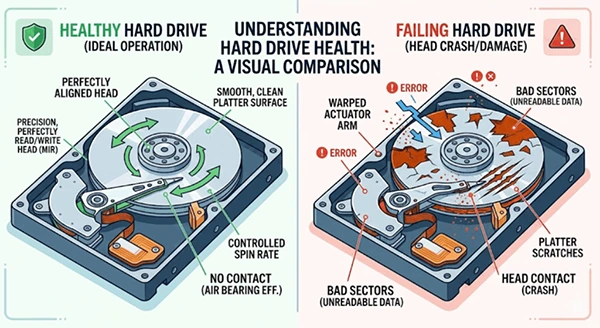
Alt- Hard drive health comparison
Take a look at the image: a healthy drive stays smooth and clean, whereas a broken one ends up with physical scratches and unreadable sectors that destroy your data.
Neglecting those little file errors can lead to major problems, spreading until your whole computer is at risk. At some point, there won’t be any way left for the system to compensate for the missing data blocks, leading to a full crash.
As the damage piles up inside your device, your operating system feels the impact too. This often triggers Windows driver issues, like annoying Blue Screens of Death on Windows, or causes Macs to just stop working randomly. Your computer acts like this when it needs to access crucial files that are trapped on a broken part of the drive.
There’s a built-in monitor for drive health called S.M.A.R.T., and if you see that scary black screen warning right after turning on your computer, indicating serious drive health issues, it’s a serious message. Don’t blow it off; consider it the hardware’s final alert.
If your machine starts crashing and showing you serious error messages, move fast to back up your personal files. Once everything is gone, you can’t get it back.
Did You Know?The first 1956 commercial hard drive was as big as two refrigerators, weighed 500 pounds, and held under four megabytes!
If your computer acts up like this, time’s running out. First, don’t try to run virus scans or disk cleanup; those heavy-duty tasks make your struggling drive work extra hard, speeding its breakdown. So, your priority should be getting your data safe quickly.
Start by stopping all downloads and software updates. Hook up an external drive or jump online for some cloud storage and focus on copying your irreplaceable stuff, like family photos and vital docs.
Save time by skipping games and programs you can redownload easily. After securing those key files, shut down your machine entirely. Last, invest in a speedy new solid-state drive to swap in before the faulty one quits for good.
Your hard drive is at the core of your digital life, holding onto all your cherished photos, important emails, and vital files. And most of the time, before these drives bite the dust, they’ll whisper some warnings our way.
This could be anything from odd sounds to unexpected slowdowns, vanishing files, or scary blue screens. The key is to not miss these signals and jump into action right away. It’s tempting to dismiss these as minor glitches, but that could be risky.
The minute something seems off, safeguard your crucial files by transferring them to an external drive or cloud storage. Staying on top of things and swapping out those failing components early can prevent a major hassle and help preserve what’s important to you in the digital realm.
Yes, unexpected electrical surges or part failures can instantly destroy your drive with zero warning.
Most traditional mechanical drives operate reliably for about three to five years of regular use.
No, clicking means physical damage inside the drive, which software tools cannot repair or fix.