Owners of huge organizations often wonder why the productivity of the whole team is down by a significant margin. Is it because of the software they use, or the communication channels? The answer is usually right in front of them and mostly overlooked.
It’s to do with the workspace setup. An uncomfortable workstation decreases motivation to actually get some tasks done and, in the long-term, is bound to create countless health issues for the employee. This is why a dynamic environment requires an ergonomic setup.
This article highlights its importance, common workplace mistakes that lead to discomfort, and healthy work habits to support your setup.
A workstation that supports the natural movement of the body and provides optimum comfort while doing so benefits not only a single employee but an entire business.
When the spot where a person works for more than eight hours a day is configured to accommodate personalized changes, the risk of injury or fatigue is minimized considerably, thereby making the importance of an ergonomic setup known almost immediately.
The following are some of the most important aspects that comprise a comfortable workspace:
Comfortable seating ensures the maintenance of proper posture throughout the work, and with the combination of back support, the person becomes more attentive.
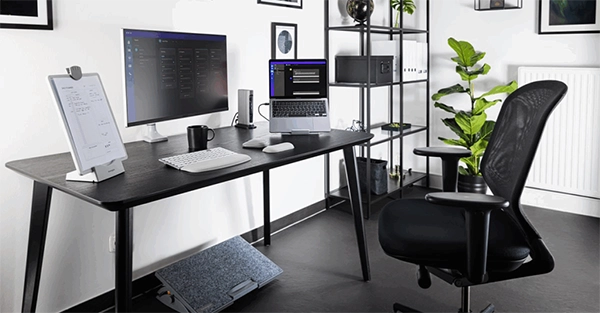
Modern offices also upgrade their workstations by adding a standing desk adjustable to their setup. This can also be utilized in remote environments where you can remain active and still get the work done comfortably.
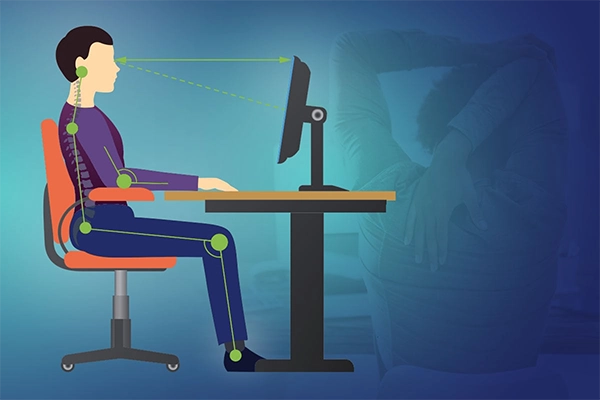
The eyes being aligned with the screen matters significantly because if you’re looking down or up at the screen, you’re more prone to getting neck pains, back fatigue, and ultimately bad posture.
Ensure that your space has a monitor that is configurable enough to adjust height and position to exactly what you need.
Now that your sitting position is perfect, let’s move on to the hardware you use. Make sure that the keyboard and mouse are kept in a straight line with ample amounts of desk space for you to rest your arms and move.
If the desk height is too high or low, ensure to adjust it to your comfort so as not to strain your wrists while using these hardware essentials.
Proper ergonomics enable natural movement of the body, thereby including configurable options to work with, which directly helps in enhancing focus and increasing productivity of the individual.
This aspect also ensures that the person avoids all risks of health-related problems and remains comfortable throughout the day.
Pro Tip
To find the perfect desk height, relax your shoulders, bend your elbows at a 90-degree angle, and stretch your fingers. Your desk height should align directly with your fingertips.
Here are a few workplace mistakes that most people commit, leaving them with chronic discomfort and pain over the years:
Bad posture is known to cause back injuries, even after you leave the workplace and decide to rest up on your sofa after a long day of work, as the strain remains.
Sitting incorrectly also leads to permanent changes in how you walk, as it’s also linked to scoliosis and other problems that are very hard to remedy.
A dimly or poorly lit room, with the screen’s brightness turned all the way up, can be a recipe for disaster as this combination forces your eyes to adapt to changing conditions, making you stare at the screen without blinking, thus causing dryness.
Many people also notice that when they exit this environment, they often feel disoriented or dizzy for a short while.
There are a few tools that you require on a daily basis, such as a notepad, your favourite coffee mug, pens, a water bottle, and more.
Fetching these when you’re dealing with strict deadlines can really break the flow and impact your concentration. This is why it’s best to keep them close when you begin working.

The following are a few healthy work habits that support and support setup and keep you focused and comfortable:
A smarter, healthier workspace doesn’t get created when you buy new things and implement them in your office. That’s just half of what’s needed.
What makes a setup truly beneficial is when the individual themselves follows healthy work habits, sets a defined routine, and keeps their setup organized and easy to reach at all times.
Ans: The following are the healthy work habits:
Bad posture is known to cause back injuries. Sitting incorrectly also leads to permanent changes in how you walk, as it’s also linked to scoliosis and other problems that are very hard to remedy.
Proper ergonomics enable natural movement of the body, thereby including configurable options to work with, which directly helps in enhancing focus and increasing productivity of the individual.
Ans: The following are the important aspects of a healthy workplace setup: