Are you wondering why small businesses need a reliable AI assistance specially when there are other technologies already involved? Well, the answer is here.
According to research completed by Exploding Topics, 77% of companies are either using or exploring the use of AI in their businesses, and 83% of companies claim that AI is a top priority in their business plans.
This article aims to uncover the reasons, uses, and technologies demarcating the essence of AI in the business world and more!
Key Takeaways
- Increasing Dependence on Technology
- Minimizing Downtime and Business Disruptions
- Cost-Effective IT Management
- Scalability and Business Growth
- Improved Productivity and Efficiency
- Access to Expertise and Latest Technology
It is almost impossible to find a business today that doesn’t use at least five different apps or software platforms. We live in an era where the cloud is where our entire professional lives live.
This dependence has made things faster, but it has also made our systems more complex.
Most small businesses now use specialized software for almost every task.
For example, you might use QuickBooks or Xero for your accounting, a CRM like Salesforce or HubSpot to keep track of your customers, and something like Trello or Asana to manage your daily tasks.
These tools are amazing because they let you work from anywhere.
However, all these tools need to talk to each other. When your accounting software won’t sync with your bank, or your project management tool won’t load, you lose time.
Reliable IT support ensures that these cloud platforms stay connected and that your team knows how to use them without getting frustrated.
Even if you have a physical store, your digital front door is often the first thing people notice.
Your website, your online payment gateway, and your social media pages are how you find new customers.
So, if your website crashes during a holiday sale, you are losing cold, hard cash and potentially regular customers.
Digital marketing tools and customer data handling require convenience,contorl and security.
When you are collecting email addresses, processing high-value transactions, and storing sensitive financial preferences, your systems must be stable and protected.
“For a precious metals business, your website is more than a storefront. It’s a vault of trust. Clients share sensitive financial details expecting them to be protected as carefully as the assets they buy. Weak digital security doesn’t just risk downtime. It risks credibility,” says Rachel Sinclair, Acquisitions Director at US Gold and Coin.
Just as you would never leave a physical vault unsecured, you cannot afford to leave your website, payment systems, or customer database exposed.
Professional IT oversight ensures encryption, secure payment gateways, regular monitoring, and compliance.
In industries built on trust and asset protection, digital security is not optional. It is rather foundational.
Fun Fact AI Can Predict Death With Upto 90% Accuracy.
For a small business, downtime is the enemy of profit. When your systems are down, your employees are essentially being paid to sit and wait, and your customers are getting annoyed.
The financial impact of a technical failure is often much higher than people realize.
Negative impact of downtime includes:
Reliable IT assistance acts like an insurance policy against these moments.
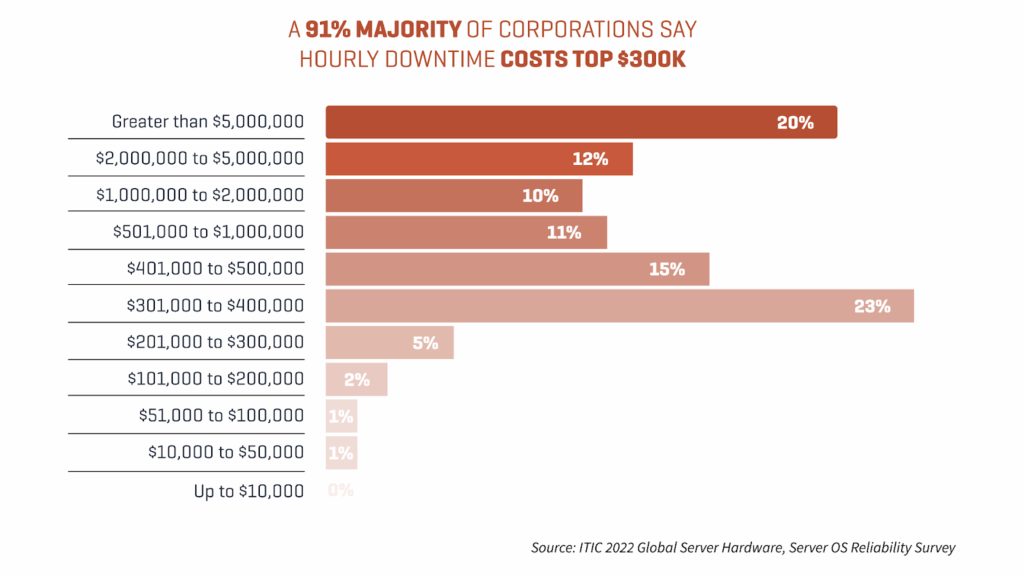
Therefore, the infographic reflects the cost of Downtime for the corporations :
The best kind of IT support is the kind you don’t even notice. This is called proactive maintenance.
Prevention is always better than a cure. So, instead of waiting for something to break and then calling a computer guy to fix it, a professional IT service monitors your systems 24/7.
They make sure your software updates are installed (which usually include vital security patches) and look for early warning signs of hardware failure.
By catching a failing hard drive before it actually crashes, or identifying a network bottleneck before it slows everyone down, IT experts keep the engine of your business running smoothly.
If you think hackers only go after big names like Google or Target, think again. Small businesses are actually huge targets because hackers know they often have weaker security.
A single cyberattack can be enough to shut down a small company forever.
The methods hackers use are getting smarter every day.
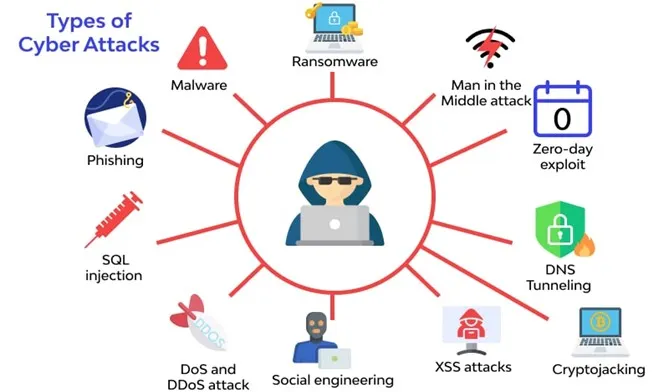
In fact, statistics show that many cyberattacks target small businesses, yet only a small fraction feel prepared to handle them.
The image below illustrates some of the most common types of cyberattacks, helping you visualize the risks your business could face and why proactive protection is essential.
Beyond just stopping hackers, you also have a legal responsibility to protect the data you hold. Whether it’s customer credit card info or private employee records, you need secure backups and strong firewalls.
“Small businesses often treat IT security like routine maintenance they can postpone. But just like electrical systems, small vulnerabilities compound over time. When something finally fails, the damage is far more expensive than preventative upkeep ever would have been,” says Andrew Bates, COO of Bates Electric.
Having professional IT assistance ensures:
Instead of reacting to outages, ransomware, or data loss, you operate with a safety net in place, protecting both your workflow and your reputation.
One of the biggest myths is that hiring IT help is too expensive.
In reality, trying to do it yourself or asking your tech-savvy nephew to do it for free usually ends up costing much more in the long run.
Hiring a full-time, in-house IT person is expensive.
For a business with only 10 or 20 employees, this usually doesn’t make financial sense.
On the other hand, Managed IT Services allow you to outsource your tech needs.
One of the best things about professional IT assistance is that it makes your budget predictable.
Most IT companies offer subscription-based models. You pay a set monthly fee, and in exchange, they handle your updates, security, and troubleshooting.
It helps you plan your finances with confidence, knowing your tech support is covered.
Every small business owner dreams of getting bigger. But growth brings new challenges. You need more computers, more user accounts, and more space for data. And a chaotic IT system would be of no help.
Reliable IT assistance helps you build a flexible foundation. This usually involves the cloud.
If you hire five new people tomorrow, a good IT partner can:
You don’t have to go out and buy expensive new servers every time you grow; you just scale up your digital subscriptions.
IT is about planning for the future. An IT expert can :
This kind of strategic thinking is what separates businesses that “just get by” from those that actually lead their industry.
How much time do your employees spend fighting with their computers? Even 15 minutes a day of tech frustration adds up to over an hour a week per person. Contributing to a massive amount of wasted time.
When something does go wrong, you need it fixed now. Most reliable IT services offer a Helpdesk.
This means your employees can call or chat with a technician immediately. Often, the tech can log into the computer remotely and fix the problem while the employee watches.
This saves time, money, and the cost involved if someone visits your office and fixes the problem.
IT assistance can also help you work smarter. They can introduce automation tools that handle boring, repetitive tasks.
For example, instead of manually typing data from one app to another, an IT expert can set up an integration that does it automatically.
“In a moving business, time lost to tech hiccups is time lost on the job. When your systems are optimized and properly supported, your team stays focused on serving customers instead of troubleshooting software,” says Adrian Iorga, Founder & President of Stairhopper Movers
Technology moves fast. It’s hard enough to run a business; you shouldn’t also have to be an expert on the latest network protocols or data encryption methods.
When you hire a reliable IT firm, you hire brains for your computer systems.
You get access to professionals in data security and network management, which impacts your business positively by getting the benefit of all that specialized knowledge without having to learn it yourself.
Software companies release updates all the time. An IT partner stays on top of these trends for you.
They can tell you, “Hey, don’t install that update yet, it’s crashing for everyone,” or “There is a new tool that could save you 20% on your shipping costs.”
Staying updated keeps you modern and prevents you from using “dinosaur” tech that makes you look outdated to your clients.
In a crowded market, being the reliable choice gives a huge advantage. If your systems run smoothly, customers will naturally gravitate toward you.
Put yourself in the shoes of a customer. If you try to pay for something and the system is down, or if you ask a question and the business says, “Sorry, our computers are slow today,” do you feel confident in them?
The answer is No. Reliable IT means your transactions are secure and your communication is smooth. This builds trust and confidence in your customers in you.
Small businesses are more prone to being affected by a fire, a flood, or a major theft at their office. For many small businesses, this can even turn into the end. But with reliable IT assistance, provides you with a Business Continuity Plan.
This means your data is backed up in a separate location (the cloud), and you have a strategy to get back to work within hours, not weeks.
“Hope is not a business strategy. For businesses that rely on digital infrastructure, a strong backup and recovery plan is what separates a temporary disruption from a permanent shutdown,” says Logan Peranavan, CEO of TapestoDigital UK.
If you are still on the fence, here are the two main ways professional IT help changes your daily life:
No matter what business you are in, investing in reliable IT assistance is one of the smartest moves you can make. It saves your data, enhances customer experiences, and builds your brand value.
It turns technology into a powerful engine that drives your growth.
In the end, what matters is having a strong foundational root that can support the growth of your business, which could be achieved by inculcating AI in the business.
AI can revolutionize small businesses by taking over routine tasks such as managing finances, offering customer support through chatbots, and fine-tuning marketing efforts.
For small businesses, AI can significantly enhance efficiency and reduce costs by handling repetitive tasks, like customer inquiries and financial bookkeeping, with precision.
Small businesses might face challenges with AI, such as errors in data processing or built-in biases in algorithms. There’s also the risk of weakening customer relationships through less personalized interactions and concerns over safeguarding sensitive business and customer data.
Selecting an AI tool involves understanding your business’s specific needs and ensuring the tool comes from a reliable source.