A business can automate customer rewards without custom development when the action that earns the reward is already recorded somewhere, such as a CRM, e-commerce platform, or survey tool. The task then becomes simple: confirm the customer action qualifies and send the reward.
The noticeable difference here is between marketing automation integrations, which move customer information between systems, and gift card integrations that send the approved reward. Keeping those jobs separate makes it much harder to send duplicates or reward an action that never qualified.
Most businesses can start with a spreadsheet, transfer to a no-code workflow when the exact job keeps repeating, and use an API only when the rules become too complex for those options.
Spreadsheet batches: Export an agreed list of recipients, amounts, and contact details, review it, then upload the file for bulk delivery.
This performs well for campaigns that run periodically or when finance requires someone to support the final list before bonuses are sent.
The downside is time. Every file still requires preparing, reviewing, and negotiating. Giftogram’s no-code reward automation helps with bulk CSV uploads and prepared sends, so the manual work can be controlled once the agreed list arrives at the platform.
No-code triggers: A CRM, survey platform, or e-commerce system records that a customer has completed the required action. Zapier or another integration then hands that data into the reward workflow.
This is where automation starts to earn its keep. A referral program spending 3,000 approved rewards every month should not rely on someone copying names into a spreadsheet every Friday.
Custom API: An API becomes useful when rewards want to live inside the company’s own product, the approval controls are unusually complex, or a no-code workflow becomes difficult to manage.
The regulation is easy: begin with the easiest approach that addresses the issue.
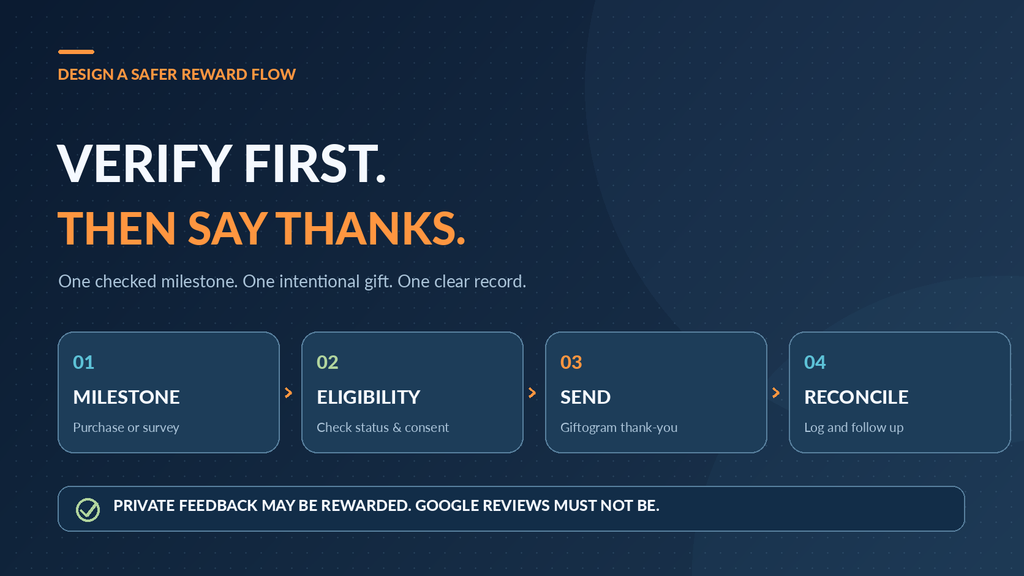
The business should confirm that the customer acquired the bonus before the automation transmits anything.
Consider a referral program. A new lead entering the CRM is not sufficient. The actual catalyst is a new customer who has delivered and, where applicable, passed the refund or cancellation window.
If the CRM marks a deal as won before settlement clears, the workflow should not blindly transmit the tip. It should wait for the payment record or require support.
Clear records across connected e-commerce systems matter because irrelevant reference data fast creates poor automation.
Every qualifying action requires a unique reference so the same investment, referral, or survey response cannot begin two rewards.
Suppose a customer referral occurs twice because the CRM log is updated after purchase. Without an identical statement, the same individual could receive two rewards for one deal.
The fix does not need to be specialized. Store the order digit, referral ID, or survey request ID alongside the bonus.
Before sending, verify whether that contact has already been processed. Then test the embarrassing issues on purpose to see what happens. This is where reward automation for businesses starts to make its place: it manages repetitive work while still giving someone control when the data looks off.
A shared record also prevents the one-person bottleneck that leaves a program dependent on one employee remembering which bonuses were already sent.
The actual cost is the reward itself plus the software and staff time needed to keep the workflow running properly.
Some B2B rewards and incentives platforms such as Giftogram charge no platform fees for standard digital rewards, so a $50 bonus costs $50.
Integrations may carry a monthly fee depending on volume, which means software costs still need to be factored in. Zapier’s free plan guide lists 100 assignments per month and two-step Zaps.
Polling triggers on that plan verify for new information every 15 minutes. And that may be plenty for a short program. Add several reviews with approvals along with follow-up steps, however, and the workflow can progress into a paid story surprisingly fast.
Automation becomes valuable when repetitive sending and checking take more time than the workflow takes to manage.
Twenty rewards once a quarter probably don’t justify involved automation; a restricted spreadsheet is probably quicker.
Three thousand approved referral bonuses every month are different, and manual copying produces more room for error: more chances for duplicate sends, bad addresses, missed recipients, and uneven logs.
Begin with one repeatable event and make it work properly; test everything: recipients, amounts, and messages, edge cases like copies and flipped transactions. Once that works, add the next occasion.
No-code stops being the best option when the reward requires to be constructed directly into a product or the business rules become too complex to manage cleanly in a no-code workflow.
Most traditional customer reward workflows do not require that level of development.
A CRM records an approved referral, a survey tool documents a completed answer, or an e-commerce platform records a verified purchase. A no-code integration can handle those assignments.
An API makes more sense when the reward experience takes place inside the company’s own software, many internal reviews must ensue before every send, or the workflow has grown too complicated to preserve comfortably in Zapier.
The decision should pursue the business issues. If a simple two-step workflow works, rebuilding it with custom code adds maintenance without creating any value.
The final principle is straightforward: decide who qualifies first, then automate the repetitive delivery.
Customer rewards become easier to scale when systems manage the admin while people keep control of the rules, exceptions, and budget.
Can customer rewards be automated without a developer?
Yes. A spreadsheet upload or no-code trigger from a CRM, survey, or ecommerce platform can send rewards after the business confirms that the customer qualifies.
What is a gift card integration?
A gift card integration connects a business system to a rewards platform so an approved customer action can trigger a reward. Giftogram supports built-in integrations and Zapier for no-code workflows, as well as a gift card API for businesses that need custom integrations. The API allows developers to automate reward sending directly from their own applications, platforms, or internal systems.
What is a Custom API?
A custom API refers to an API key specially crafted to implement special requirements and to serve the custom demands of a business integrating with its software.
Yes. A spreadsheet upload or no-code trigger from a CRM, survey, or ecommerce platform can send rewards after the business confirms that the customer qualifies.
A gift card integration connects a business system to a rewards platform so an approved customer action can trigger a reward. Giftogram supports built-in integrations and Zapier for no-code workflows, as well as a gift card API for businesses that need custom integrations. The API allows developers to automate reward sending directly from their own applications, platforms, or internal systems.
A custom API refers to an API key specially crafted to implement special requirements and to serve the custom demands of a business integrating with its software.