Have you ever accidentally sent a message to someone and didn’t want to send it? After sending the message to someone, you now regret that decision.
If you did these things on Instagram, don’t be afraid because the platform gives you the option to unsend message Instagram accidentally sent or that you don’t want to send. The feature is called Unsend Message.
With the help of the Unsend Message feature, you can unsend any text message, media reel, GIF, sticker, reaction picture, and voice message in just a few easy clicks.
Whenever you accidentally send a message to someone on Instagram, you can easily unsend the message. After you unsend the message, the message will disappear from the chat for both of you, and the other person won’t get any notification, and there is no deleted message pop-up shown to the other person.
You can unsend the message after the person has seen the message you want to delete. There is a huge difference between a deleted Instagram message and an unsend message.
Deleted messages can be recovered, and unsent messages cannot be recovered.
Key points of an unsend message on Instagram.
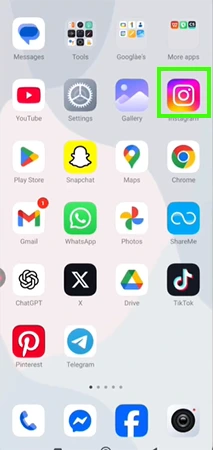
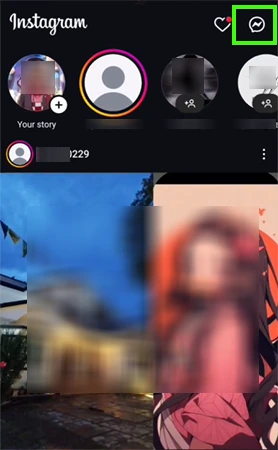
Instagram gives you a direct feature to unsend any message. Follow these easy steps to unsend an Instagram message.
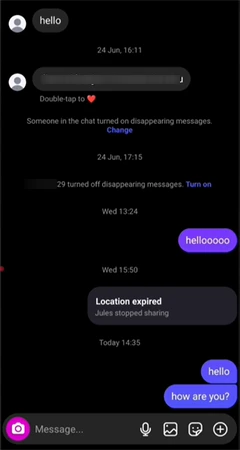
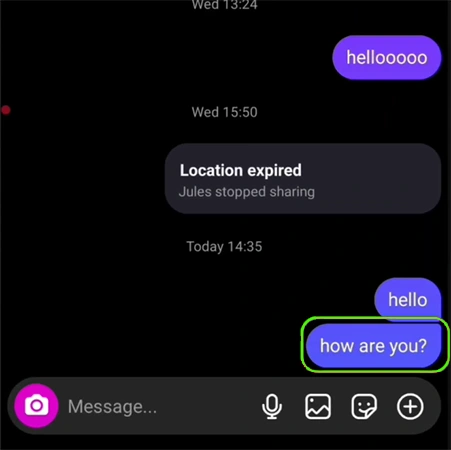
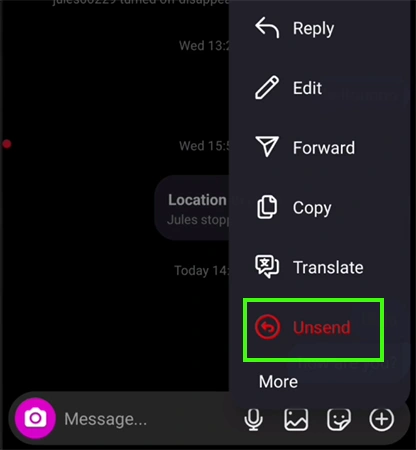
If you constantly hit Unsend Message Instagram, it might be time to try Vanish Mode. In any 1-on-1 chat, you can try Vanish Mode. Everything you send in this mode, including messages, photos, GIFs, and links, disappears automatically as soon as the other person sees it and you close the chat.
The best part of Vanish Mode is that safety is built in. Instagram will notify you instantly if someone takes a screenshot while you’re in Vanish Mode.
No, after unsending the message, the person does not get any notification.
Yes, you can unsend the message on Instagram after an hour, and there is no time limit to unsend any message.
No, you cannot directly see or recover a message on Instagram once the sender has unsent it.
You can only delete the message for yourself, and performing an unsend will remove the message for both users.
You may not see the option or be able to unsend the message because of a temporary app glitch or an outdated app version.
Instagram has one of the best features called unsend messages. This will help you to unsend any message you send accidentally to someone. It will remove the message from the chat, and the person won’t get any notification about it.
There is a mode called vanish mode where you can chat safely with anyone because, in vanish mode, the chat will be removed automatically after it is read, and you get an instant notification if someone takes a screenshot.
If this guide is helpful, you can check out more such guide videos on the Getassist YouTube channel.