“Zero Trust is not a technology you buy, but a philosophy you adopt.”
— Neil MacDonald, Gartner VP
Cornerstone of modern technology, Zero Trust is a mindset shift, not a “plug-and-play” solution. And in a sensitive environment like healthcare, the relevance of Zero Trust becomes very important.
In the post-COVID world, workforce teams working from a single office have gone obsolete. This is also true for the healthcare sector. Some healthcare professionals work remotely, while others work in-person. Members of a single team can be scattered around the globe. Salesforce Health Cloud is designed to exactly handle this chaos.
Salesforce Health Cloud implementation services let you: set which roles can access which data, from which networks, via which authentication protocols. How access will be monitored and audited is also decided beforehand, so that the situation doesn’t go haywire as the system rolls out in the real-world setting. Also, a lack of security can lead to grave consequences; it’s a question of life and death.
IP controls are one of the easiest and most practical solutions to address security issues. It decides whether a particular account or network should be allowed to log in or access an API. It reduces sensitive data exposure and compromise of privileged accounts. But careless use can also lead to lockouts and workflow disruption.
In this article, I will walk you through implementing IP controls for your healthcare operations in a zero-trust way.
KEY TAKEAWAYS
- Salesforce Health Cloud supports secure healthcare workflows.
- IP allowlisting is a strong control if the network is stable.
- Encryption and auditing reduce sensitive data exposure and improve accountability.
- A good zero-trust security protocol involves least privilege by default while not over-relying on network location.
Health Cloud often brings more sensitive data, more integrations, and more varied user populations than typical CRM deployments. That combination creates a distinct risk profile.
First, healthcare data is high-value. Credentials are frequently targeted through phishing, password reuse, and social engineering. Second, operational urgency is real. When security controls interrupt clinical workflows, teams tend to create exceptions quickly, and those exceptions can become permanent. Third, integrations are unavoidable. Data rarely stays inside Salesforce, so the security boundary must extend to middleware, APIs, and vendor access paths.
A security-by-design mindset doesn’t assume your users are malicious. It assumes the environment is complex, and attackers will test it continuously. The goal is to make unauthorized access harder, reduce the cascading effect when something goes wrong, and keep the system visible enough to monitor and respond quickly.
INTERESTING STAT
According to an IBM report, the healthcare sector faces the highest average breach costs every year, reaching 10.93 million USD in 2024.
Many IP-related settings in Salesforce can easily confuse you. So, to get expected outcomes, first familiarize yourself with each of them.
Profile-level Login IP Ranges are the “hard gate.” When you define allowed ranges on a profile, Salesforce can deny login attempts originating outside those ranges. This is the closest match to a true IP allowlist for interactive sign-ins.
Org-level Trusted IP Ranges (Network Access) are not the same thing. They’re typically used to reduce login friction (for example, reducing verification challenges on known networks). They may improve usability on trusted networks, but they are not a substitute for profile restrictions when your objective is to prevent access from untrusted IPs.
There’s also a session behavior nuance that matters in real deployments: some environments enforce IP restrictions at login time, while others configure settings that continuously enforce IP ranges as requests are made. If you want tighter control for high-risk roles, you’ll want to evaluate Salesforce’s session and IP enforcement settings carefully and test them against your actual access patterns, especially mobile and vendor access.
In Health Cloud, the key is scoping. Strict IP allowlists on day one itself almost always backfire. This is because too many users have dynamic or unpredictable networks.
Accounts where both risk and control are highest require an even more resilient approach.
Privileged users (admins, security administrators, and anyone who can export large volumes of data or change security settings) are the first group to lock down. These users should typically be required to connect from stable networks such as corporate office IP ranges or a corporate VPN with fixed egress addresses. In practice, this one step often eliminates a large portion of “catastrophic access” risk.
Integration identities are the next high-leverage group. Unlike people, integrations can be engineered to originate from predictable IP ranges (more on that below). When you can constrain where API traffic comes from, stolen tokens and compromised credentials become far less useful.
For broad operational teams (nurses, care coordinators, schedulers, contact center staff) strict allowlisting may still be useful in specific contexts (for example, call centers with stable networks), but it’s often better as a partial control combined with stronger identity policies. In other words: make IP restrictions strict where you can, and use zero-trust identity and monitoring where you can’t.
Like all other organizations, even healthcare teams work in blended modes: some staff are on-site, some work remotely, while the rest are hybrid. Access pattern for each affects the reliability of the proposed IP allowlisting.
Home networks are frequently dynamic. ISPs can rotate addresses, and users can shift between home Wi-Fi and hotspots without thinking about it. Mobile networks can be even more unpredictable because carrier-grade NAT and network switching can change the apparent source IP frequently.
This is why VPN strategy matters. If you want IP allowlisting to be a reliable control for a given user group, you generally need a controlled egress path – most commonly a corporate VPN whose outbound traffic exits through stable IP addresses. Without that, strict allowlisting tends to generate constant exceptions, and exceptions weaken the control.
When VPN requirements aren’t feasible for everyone, the best compromise is usually to keep allowlisting strict for privileged accounts and rely on identity-layer controls for broader groups. That means MFA everywhere, step-up authentication for risky situations, and tighter session policies for sensitive roles.
Zero trust is often summarized as “never trust, always verify,” but what matters is how you implement that idea in a healthcare environment.
It starts with authentication. MFA should be expected for all interactive users, and privileged roles should face stricter policies. If you use SSO, your identity provider can add conditional controls based on device posture, risk signals, and session constraints.
It continues with authorization. Least privilege is not optional in Health Cloud. Overbroad access is a common reason healthcare implementations fail audits or create exposure in incident scenarios. Roles should be mapped to actual job functions, and sensitive objects and fields should be gated carefully. Integration accounts should not have “everything” access simply because it’s convenient.
Zero trust also means reducing dependence on any single signal. IP location can be helpful, but it shouldn’t be the only gate. An allowed IP should not override weak authentication. Neither should there be broad permissions just because the network is trusted.
Access controls just reduce risk, not eliminate it completely.
For healthcare, you need to protect sensitive data and be able to answer audit questions quickly and credibly. Encryption does the job for you.
But many Salesforce security and compliance conversations include Salesforce Shield. It has Platform Encryption and auditing/monitoring capabilities. How you use it completely depends on your license, regulatory requirements, and Health Cloud data framework.
Auditing is the other part. In healthcare workflows, records can change rapidly – care plans, interactions, consent updates, case notes. You want a clear approach to what needs to be logged, how long you retain it, and how you investigate unusual activity. Auditability should be defined early because it influences configuration decisions and integration architecture.
Safeguarding PHI data is a serious business. Here, integrations deserve as much attention as access.
The strongest pattern for IP control on integrations is stable egress. If middleware or custom services run in cloud infrastructure, route outbound traffic through a controlled NAT gateway, proxy, or firewall so API requests come from a known set of IP addresses. This makes allowlisting practical and reduces the chance that stolen credentials can be used from arbitrary infrastructure.
Equally important is identity separation. A single integration user shared across multiple systems creates a “master key.” If that key leaks, or if one connected system is compromised, your exposure expands dramatically. Separate integration identities by function, limit each account’s permissions to what it needs, and avoid reusing secrets across environments.
You should also test authentication flows early. Health Cloud integrations often involve OAuth, connected apps, and token-based access. IP restrictions can interact with those flows in ways that aren’t obvious until a vendor goes live or a mobile workflow is introduced. Early testing prevents last-minute “temporary” relaxations that never get rolled back.
IP information helps detect anomalies, but with healthcare, you need to be somewhat privacy-conscious. The goal should be just detecting suspicious patterns; it shouldn’t extend to surveilling users.
Practical signals often include repeated failed login attempts from many IPs (credential stuffing), sudden changes in network characteristics for a privileged user, unusual access timing for high-risk actions, and API traffic that deviates sharply from baseline.
What makes these signals useful is correlation. IP context becomes far more actionable when you can tie it to authentication events, administrative actions, data exports, or unusual API activity. Define what “high risk” means for your environment, and decide what the playbook is when those patterns appear: step-up authentication, session revocation, access review, or incident investigation.
You can successfully roll out the Health Cloud only if it aligns with your real-life operations.
Start with discovery. Map how users and integrations will actually connect, including remote staff, vendors, and call centers. This is not paperwork—it’s how you avoid building policies that conflict with real access patterns.
Then secure privileged access first. Apply strict IP allowlisting to admin and high-privilege roles and require controlled egress (often via VPN). Ensure you have an emergency access process that is secure but usable under pressure.
Next, engineer integrations for predictable behavior. Stable egress plus scoped integration identities usually delivers the biggest risk reduction with minimal user friction.
After that, expand controls carefully where they fit operationally, such as call centers with stable networks, while relying more on identity policies and monitoring for user groups with highly variable IPs.
Finally, validate auditability. Confirm you can answer core questions such as who accessed sensitive records, from where, and what high-risk actions were performed. If you can’t answer those questions quickly, you’ll struggle during audits and incident response.
The following infographic summarizes the implementation of Salesforce with a Zero-Trust approach into 7 steps:
The following infographic summarizes the implementation of Salesforce with a Zero-Trust approach into 7 steps:
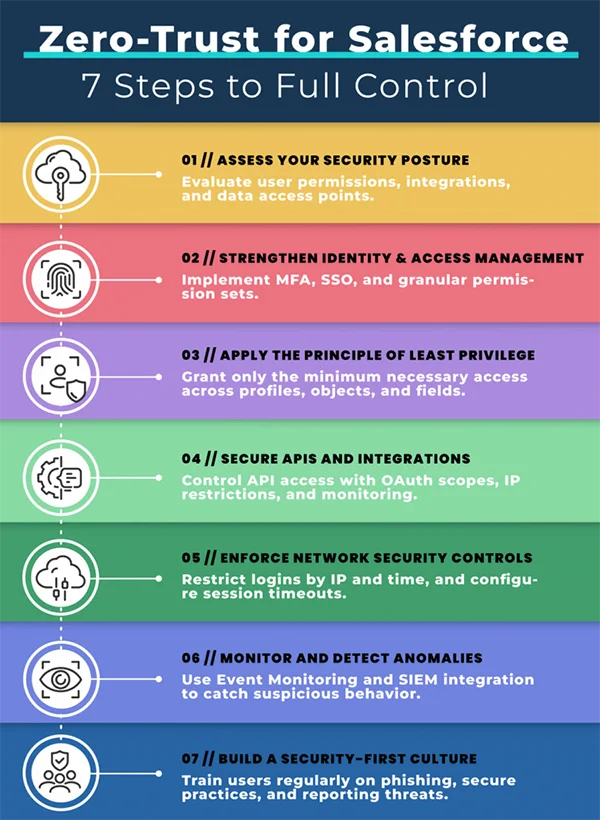
Salesforce Health Cloud supports secure and privacy-conscious healthcare workflows. However, the decisions taken during planning determine the resulting implementation. IP allowlisting is a strong control when applied where network stability exists, especially for admins and integrations. Zero-trust principles help you avoid over-relying on network location, while encryption and auditing reduce exposure and improve accountability when sensitive data is involved.
The healthiest security posture is layered: stable egress where possible, strong identity everywhere, least privilege by default, and monitoring that turns network context into actionable signals. When those pieces are designed together, Health Cloud stays usable for care teams while becoming far more resilient to modern threats.
Three principles of zero-trust are: i) verify explicitly, ii) use least privilege access, and iii) assume breach.
The 5 pillars of zero trust are: i) identity, ii) devices, iii) networks, iv) applications & workloads, and v) data.
To restrict IP addresses in Salesforce, just set ranges for allowed IP addresses. The setting is at Setup > Profiles > Login IP Ranges.
Yes, Salesforce Health Cloud is GDPR compliant.