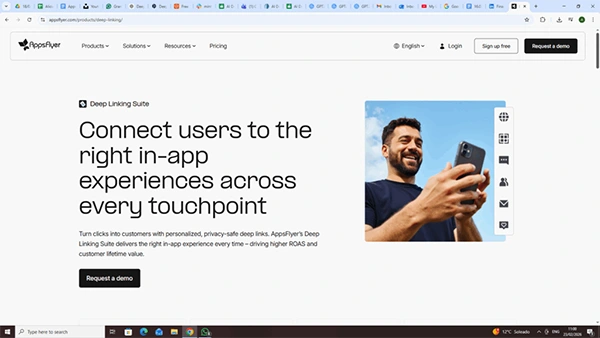
AppsFlyer’s Deep Linking for iOS has become essential for users to ensure that the right in-app experience is provided every time. But what does it actually do?
Built around OneLink and Unified Deep Link (UDL), it doesn’t just show how to open a URL, but directs users to specific in-app content rather than the homepage, segregating existing and new users to different destinations.
Let’s understand how one can use it to drive higher ROAS and customer lifetime value while also providing an enhanced experience to its users.
Key Takeaways
- Deep linking complements Apple’s app-opening mechanisms by adding more functionality to an already secure and optimal path
- The first step is to set up Universal Links on iOS, which establishes the association between the app and Apple, which proceeds to the main association process
- Deferred linking is a process that redirects a user to first install the app, and then routes back to where they were originally supposed to be after app installation
- Extended deferred deep linking solves the issue if the delay takes longer than 15 minutes to process, allowing the process to stay on track
On iOS, AppsFlyer’s deep linking complements Apple’s app-opening mechanisms. Apple already has the mechanisms, managed by LaunchServices, designed for security and integration within its ecosystem. When an application launches, a complex sequence ensures security and resource management.
AppsFlyer supports that process, with Universal Links being the optimal path, and URI schemes becoming a fallback option.
Universal Links directly open the app and are supported on iOS 9+, and Apple’s associated domains are the basis for Universal Links.
Realistically, it’s a three-layer setup:
There are two important concepts to understand before we give you a step-by-step tutorial.
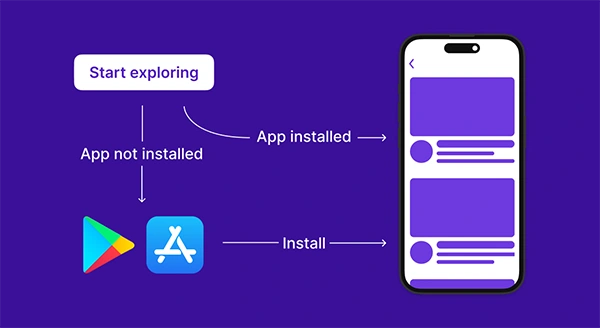
Direct deep linking is for users who already have the app installed. Deferred deep linking is for users who install the app first and then are routed to the intended content on the first app launch. So, for example, they might Google something like ‘women’s shoes’ and be prompted to download an app.
With successfully implemented deferred deep linking, users install the app after being redirected to the App Store, open it, and land on the intended page instead of the frustrating homepage.
AppsFlyer’s help center describes direct deep linking as sending existing users into a specific in-app experience.
For modern iOS implementations, AppsFlyer notifies developers that Unified Deep Linking should be used. Their iOS UDL is the way for both new and existing users to be sent to different in-app activities when the app starts up.
To make it simple to follow, we’ve put the tutorial in a step-by-step format.
For the initial setup, you need the app bundle ID and prefix ID, and then enable Associated Domains in Xcode. The OneLink subdomain is then added in the format applinks: subdomain. onelink.me.
Once the redirection logic of OneLink’s template is successfully set, AppsFlyer hosts the apple-app-site-association files used in the main association process.
Universal Links are the native iOS bridge, and OneLink plugs into that bridge rather than replacing it.
For iOS UDL, in the didFinishLaunchingWithOptions, the app should set the Apple App ID and AppsFlyer dev key before assigning the deepLinkDelegate. The sample code also shows AppsFlyerLib.shared().deepLinkDelegate = self.
Nothing will work in the deep-link flow if the SDK doesn’t initialize correctly.
AppsFlyer’s iOS UDL code sample states the app should pass Universal Links into AppsFlyer using:
With that, iOS opens the app, and then your AppDelegate hands the incoming context to AppsFlyer before AppsFlyer resolves the deep-link payload.
Fun Fact
Developers can reverse-engineer Apple’s shortcuts apps to create custom home screen icons that act as deep links, allowing users to, for example, click on an icon and instantly order their favorite coffee
Developers must implement DeepLinkDelegate to override didResolveDeepLink. Their sample checks the result status (not found, failure, found) and then reads the deep link object and parameters, such as deep_link_sub2.
Deferred deep linking redirects the user to the App Store first and then routes them to the intended page after successful installation.
This flow mandatorily requires developer implementation, and the basic SDK guide points developers to deferred deep-linking implementation for users without the app installed.
AppsFlyer’s UDL privacy model means that for new users, UDL only returns deep_link_value and deep_link_sub1-10. Other parameters, such as lmedia_source and campaign return, are null in that path.
UDL alone isn’t always enough. Examples include when the click-to-install delay exceeds the UDL lookback window of 15 minutes, or when clicks come from SRNs, and the required deep-link parameters are missing from the UDL response.
In that case, AppsFlyer recommends handling onConversionDataSuccess through the Get Conversion Data API.
For simple, direct deep linking, UDL is the main path. For more resilient deferred deep linking, especially edge cases, AppsFlyer recommends pairing UDL with GCD-based fallback logic.
AppsFlyer provides a reasonably clear modern iOS path. The setup is simple if you follow the tutorial, and the result is a more cohesive and fluid app experience for your users. The personalized, privacy-safe deep links are exactly what you need.
Ans: Deep link is important as it prioritizes user experience by redirecting existing and new users to two different in-app pages instead of the same app homepage. This provides a custom experience for each user.
Ans: Deferred deep linking is a technique of deep linking in iOS where the user is first redirected to install the app, and then routed back to the required page they were supposed to visit originally from the app.
Ans: It is realistically a three-layered setup:
Ans: This gives ease of access to regular users of the apps and massively increases the accessibility of the user interface by providing many options through a seamless interface, thus increasing ROAS and customer lifetime value.