“MP3’s are perfect.” – Kristin Hersh (Singer and Guitarist)
But Apple might disagree with Kristin Hersh. Apple Music streams the songs in AAC/ALAC format and doesn’t allow MP3 downloads.
However, there are ways to convert your Apple Music tracks into MP3 format and enjoy them on any playback device.
This article will inform you about software applications that can convert your favourite tracks into MP3 files.
KEY TAKEAWAYS
- Apple Music is good, but sometimes you need MP3 files of your favourite tracks.In those situations, Apple Music converters come to your rescue.
- Use only trustworthy conversion software.
- Never use downloaded files for commercial or malicious purposes.
Sometimes, situations arise when you want to take your favourite music out of the Apple bubble. It can be that you don’t have internet and want to listen to your favourites offline. Or you don’t have your Apple device with you. The one you have doesn’t support streaming.
What do you do now?
You might think of downloading the MP3 song file from Apple Music. But guess what, Apple Music DRM doesn’t allow saving or downloading of MP3s.
INTERESTING STAT
Apple Music marked its 10th anniversary in 2025. It also broke all previous records of listenership and new subscribers (Apple).
You can’t download MP3s from Apple Music. Now what?
There are many easy and reliable ways to convert your songs on Apple Music to MP3 format and then download those files without losing any sound quality.
Dedicated Apple Music Coverters are easy one-stop-shop solutions for downloading your Apple Music tracks in MP3 format to enjoy them offline. These are fast, secure, and easy-to-use software that offer high-quality MP3 downloads.
You can even batch convert fast and effortlessly. Your Apple Music playlist with tens of tracks gets converted and downloaded in minutes.
I would personally recommend you convert Apple Music to MP3 — using ViWizard Apple Music Converter. Its benefits are:
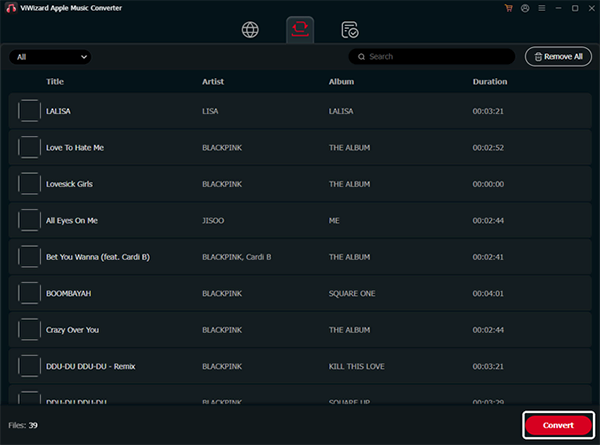
Simply follow the steps given below to convert/download your favourite tracks on Apple Music through ViWizard Apple Music Converter:
General desktop conversion applications might not be made for Apple Music conversion, but they get the job done.
They allow easy conversion and download of the purchased or non-DRM-protected songs from your Apple Music library.
These software applications are usually free and open-source.
If you don’t want to download and install applications on your PC, there are online Apple Music converters to the rescue.
This method is easy and fast.
You can access these online tools simply through your regular browsers. Many online converters support playlist links.
However, sometimes these converters don’t support DRM-protected songs or process them slowly.
If everything fails, you can use the audio recording method.
Herein, you just need an audio software that can record (Audacity is a good example).
You can follow the simple process for this method:
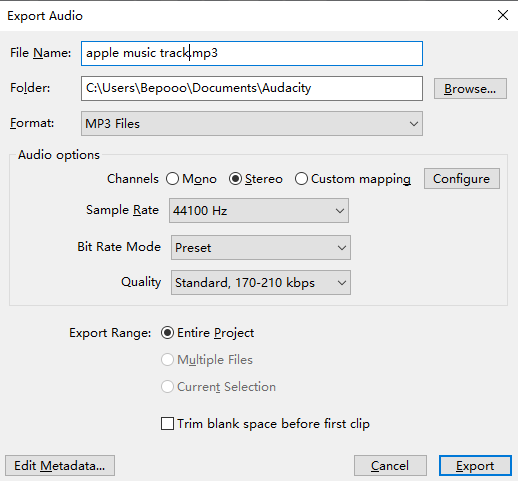
Though you can easily convert and download songs from Apple Music, you should keep some legal and usage considerations in mind:
All the musicians should get deserved credit and compensation; still, music should be free-flowing.
Apple has put up every barrier to keep you inside its ecosystem.
Don’t get me wrong. Apple’s ecosystem is one of the best. But sometimes you can get into situations when it doesn’t help to be an Apple Music fanboy.
In those situations, Apple Music converters come to your rescue. They provide you with universally compatible MP3 files with ease.
But use only trustworthy conversion software and never use the downloaded files for commercial or malicious purposes.
You can convert Apple Music to MP3 format using dedicated software or recording methods. There are many websites for online conversion and download.
Many Apple Music converters allow batch processing. You can use that to convert your Apple Music library into MP3 format.
ViWizard Apple Music Converter is the best software to convert Apple Music to MP3s.
The easy-to-use software allows high-speed, stable, and lossless conversion.