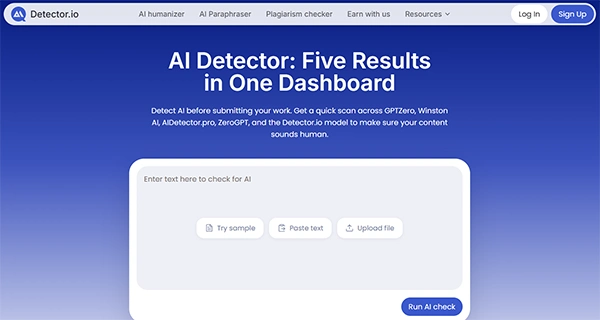
A-written text is fairly simple to create. You just enter a few prompts, make some changes, and you get a ready draft, but the real challenge arrives when you have to pass it through a detector, with every tool displaying conflicting results.
Detector.io treats this issue as a workflow problem. Its AI detector tool redirects the text to five different detection providers and shows each result in a unified dashboard. From there, you can inspect flagged pieces, review segments, and test each version. The process remains straightforward, making outputs much easier.
This guide outlines what makes Detector.io different from other detection tools and mentions its various features.
Key Takeaways
- Detector.io shows results from GPTZero, Winston AI, AIDetector.pro, ZeroGPT, and its own model after one scan
- After a scan, the dashboard shows provider scores and sentence-level flags. You can then focus on the passages that need a closer look
- This wider view makes the uncertainty visible. People can compare the evidence before deciding what it means
- The platform works best when detection starts the review rather than ends it. The scores point to questions. The editor still decides what the answers mean
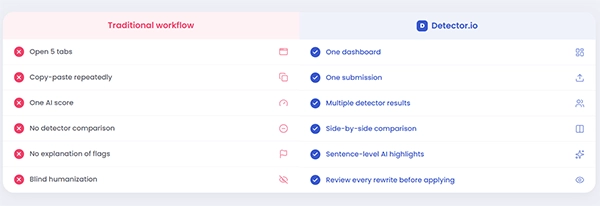
Most AI detection tools handle one step. You paste in a draft, receive one score, and leave. For another view, you open another site and repeat the job.
Detector.io shows results from GPTZero, Winston AI, AIDetector.pro, ZeroGPT, and its own model after one scan. The scores stay separate instead of being blended into one average. This makes agreement and conflict easy to spot.
That matters because detectors often disagree. Each model uses its own data, rules, and scoring method. A wide gap does not prove that one tool is broken. It shows that AI detection needs context.
Detector.io works as an AI content detector and an editing space. After a scan, the dashboard shows provider scores and sentence-level flags. You can then focus on the passages that need a closer look.
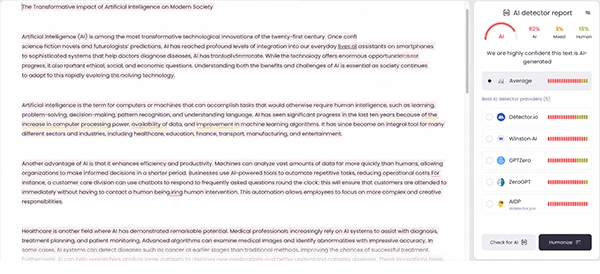
The built-in AI humanizer can rewrite selected lines without changing the whole document. You can accept useful edits, reject weak ones, and protect citations, headings, names, formatting, or chosen sections. Once the edits are ready, Detector.io checks the new version again.
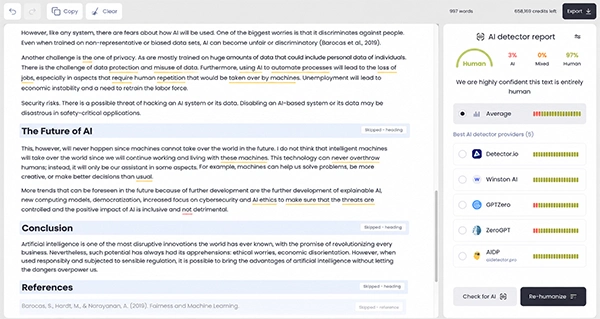
A typical review takes five steps:
| Feature | Why it matters |
| Multi-detector scan | Sends one text to five providers |
| Side-by-side results | Shows where scores agree or conflict |
| Sentence-level flags | Points to passages that need review |
| Selective humanizing | Rewrites chosen text |
| Protected content | Leaves key details and formatting unchanged |
| Accept and reject controls | Keeps the writer in charge |
| Instant re-testing | Checks the revision without a new setup |
This turns an AI detector comparison into part of the editing process. The aim is to find risk, review the text, and decide what needs attention.
A manual review with multiple AI detectors gets messy. The same draft must be pasted into several sites, the results need to be recorded, the text is edited, and the process starts again.
Detector.io keeps the draft, scores, flagged sentences, rewrites, and new checks connected. That makes changes easier to track and lowers the risk of testing an old version.
The platform can help teams verify AI generated content, but no detector can prove who wrote a passage. Detector.io also warns that results may vary and should guide a review. Schools, publishers, and employers still need context, source checks, draft history, and human judgment.
| Strengths | Limitations |
| Five results from one scan | Scores may still conflict |
| Clear side-by-side comparison | Results need human judgment |
| Sentence-level review | Rewrites may need another edit |
| Selective edits with protected content | Detection remains probabilistic |
| Re-testing in one workspace | Free access has limits |
| One account for the full flow | A low score does not prove authorship |
AI detection software can support a decision, but it should not make the decision alone. The humanizer also needs review. A smoother sentence may still change a fact or flatten the writer’s voice.
A standard detection tool gives one percentage and a label. That may be enough for a quick check. It’s much less helpful when the result carries weight.
Detector.io shows how several engines read the same text. A strict provider may flag a pattern that others miss. One extreme score may also stand out as an outlier when the other four are much lower.
This wider view makes the uncertainty visible. People can compare the evidence before deciding what it means.

Detector.io has four billing options. The weekly plan costs $7 per week. Monthly access is $19 per month. The quarterly plan costs $39 every three months, or $13 per month. The annual plan is billed at $114 per year and is listed at $10 per month. Longer plans lower the effective monthly cost, but they require a larger payment upfront.
Every paid plan includes multi-model detection, the AI humanizer, full AI reports, and faster processing. Detector.io also offers easy cancellation and a 30-day money-back guarantee. Extra credits can be purchased when the plan allowance runs out. Credits renew each month, even when the subscription is billed quarterly or annually.
Detector.io does not remove the uncertainty around AI authorship. Its main strength is a clearer review process.
Educators can check several signals before raising a concern. Marketers and publishers can move from a flagged sentence to an edited version without changing tools. Agencies can review outside work without keeping a manual score sheet. Businesses can add AI verification to a content check without opening a maze of tabs.
The platform works best when detection starts the review rather than ends it. The scores point to questions. The editor still decides what the answers mean.
It currently shows results from GPTZero, Winston AI, AIDetector.pro, ZeroGPT, and Detector.io’s own model.
No. Each provider result appears on its own, so agreement, conflict, and outliers are easier to see.
Yes. You can work on selected passages, review each change, and protect items such as headings, citations, names, and formatting.
It’s free to try: you get 500 credits per day. Paid access costs $7 per week or $19 per month. You can also choose the quarterly plan at $39 every three months, or the annual plan at $114 per year.
A detection result alone cannot establish who wrote the text. Detector.io works best as one part of a wider review that includes context, sources, and human judgment.