Are you unaware of what does the green dot mean on Snapchat? But look at it every day while sending snaps and viewing the Snapchat stories of your friends and family. So, in short, it is an activity status, but its significance goes beyond that feature. That’s why this blog by Getassist explores the total functionality of the green dot Snapchat.
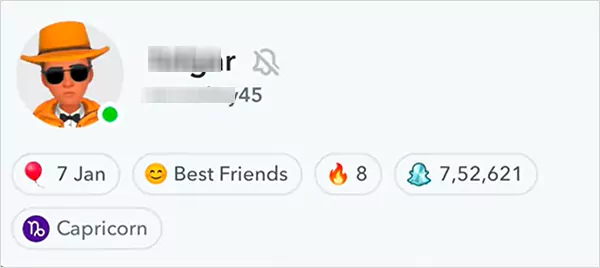
The answer to the question of what does the green dot mean on Snapchat is actually very simple: it is an activity status on Snapchat, which is placed beneath your BitMoji and tells your friends and family whether you are online or offline. This feature is often enabled to improve communication, but users can disable it as per their preference.
As it is a status indicator, it shows our presence to our added members but disappears when someone unadds you on Snapchat. Now, this feature can be disabled/enabled using the same simple steps
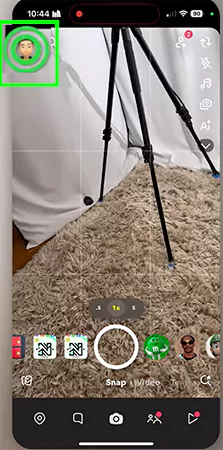

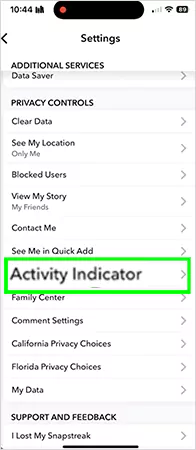
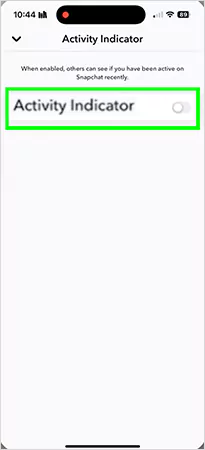
Now we think you’ve got the perfect idea of what does the green dot mean on Snapchat. If you want to learn more troubleshooting tips for Snapchat and other social media handles, then you can check out the GetAssist YouTube channel and hit the bell icon for the latest updates.
If you want to disable the green dot on Snapchat but are confused about whether it will work out or not, then here are some little benefits of this feature mentioned below that will give you a sort of clarity.
We hope everyone knows what does the green dot mean on snapchat and the effective benefits of disabling it. By doing simple steps, you can enable this setting to foster better and turn it off for improved privacy, which depends on your preference or mood. If you liked this content, then make sure to follow GetAssist on its website and subscribe to its YouTube channel, and hit the bell icon for rapid updates.
It is completely accurate because it shows the availability of the users only when they are active and gets disabled whenever the user closes the app.
To see if anyone has rewatched a story you’ve posted, tap on it, then swipe up.
Yes, it does notify when someone takes a screenshot of chat or a snap.