“The goal of migration is not just to move data, but to improve the environment it lives in.”
Do you feel the squeeze? If you are on Azure’s Single Server, you’ve likely noticed its limitations. With Microsoft retiring this model, you are facing a mandatory move, but it is actually a major performance upgrade. Moving to a Flexible Server isn’t just a task; it’s your chance to fully power up your data architecture.
Key Takeaways
- Reliability: Zone-redundant high availability is an essential aspect.
- Control: Flexible Server provides custom maintenance windows.
- Efficiency: For better performance per dollar, you can go with a Linux-based architecture.
There have been plenty of dev teams that hit a ‘performance ceiling’ where their database begins lagging during peak hours. If you are also tired of dealing with the rigid scaling and frequent 503 errors that disrupt your user experience, it is time to look towards the
Flexible Server architecture. Single Sever was a pioneer; however, it lacks the granular control that is needed by modern, high-demand applications.
The shift is not just cosmetic; it is a fundamental rebuild of how your database manages resource allocation.
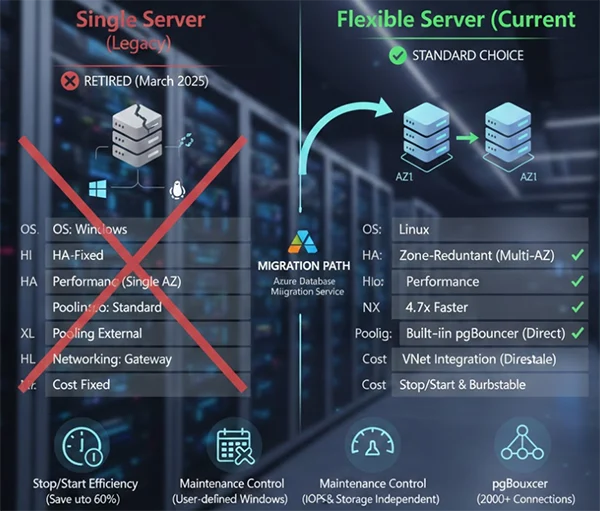
The Flexible Server uses a Linux-based VM architecture, which is more streamlined than the older Windows-based containerization of the Single Server. This allows you better resource isolation and faster disk performance.
Did You Know?
If you use Flexible Server, it will allow you to ‘stop’ your server when it is not in use to save on compute costs. It is a feature that Single Server never had.
In the old days, ‘high availability’ mostly felt like a lucky charm. Now, you can use a standby server in a completely different Availability Zone. This redundancy ensures that if one zone gets dark, your business will always stay bright.
The most important thing is to maintain windows. You no longer have to cross your fingers during the forced updates of Azure; you define exactly when patches happen.
Before you actually flip the switch, you need a proper roadmap. It is always recommended to check for a Contabo promo for servers and storage if you are looking forward to running hybrid backups or off-site development environments during the transition period to save on overhead.
Your business cannot afford an hour of silence. Your choice between ‘Online’ and ‘Offline’ migration depends completely on how much quiet time your users can bear.
Flexible Server introduces private access through VNet Integration. You’ll need to map out your subnets ahead of time to make sure that your lead-generation funnel does not break because of a lost connection between your web apps and the database.
Although you can save money using the Flexible Servers, their high-availability features increase the monthly charges. You can balance the performance needs based on your budget early.
Fun Fact: The original name of PostgreSQL was ‘Postgres’, which refers to its origins as a successor to the ‘Ingres’ database.
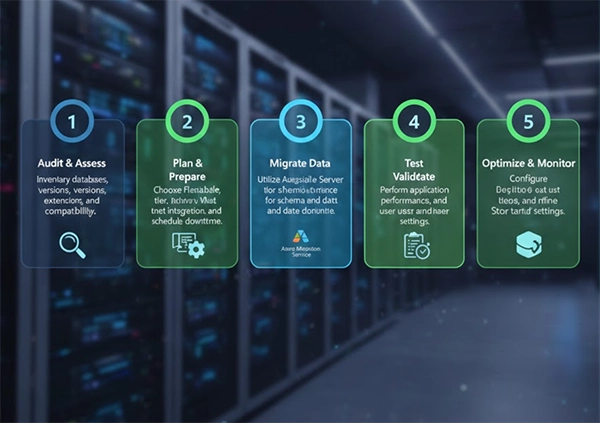
If you do not want your migration to get snagged at the finish line, you are supposed to treat the transition as a strategic operation instead of treating it as a simple data transfer.
Once you have landed, do not just walk away. You must stay at the location, as an essential requirement for you is to constantly observe your CPU credits, which you can use during peak performance.
If you notice any persistent dipping, you need to upgrade your system to the General Purpose tier, which will offer stable IOPS and will also provide compute power because your system shows an ongoing performance decline.
Near-zero downtime is possible using the Azure Database Migration Service (DMS) for online migrations.
Yes, Single Server is getting retired as Microsoft has set a retirement path, making the move to Flexible Server essential.
Yes, therefore, you must update them because the ‘@servername’ suffix is no longer needed for authentication.