Instagram is widely used by countless people every day for communication and business, but taking a break from necessary activities becomes impossible for users. However, with the help of Quiet Mode on Instagram, things have completely changed now, as it can help us to avoid unnecessary chats and doomscrolling. This GetAssist article will cover how to turn on the Quiet Mode of Instagram, which is also known as Sleep mode, very comprehensively.
And if you want a video explanation of different Instagram features, you can check out the GetAssist YouTube channel and hit the bell icon for the latest updates.
Quiet mode on Instagram, often called Sleep mode, is a setting that provides a DND experience by silencing all notifications and enabling automated replies. It also provides an auto-summarizing option when you hop back on Instagram, so you won’t miss your regular updates. Although this feature gets enabled at night in regular usage, you can customize it according to your daily activity.
Enabling Sleep mode, or popularly known as the Quiet mode on Instagram, is very simple, yet it provides effective privacy benefits without making you an anonymous Instagram profile to your friends and family. Let’s take a look at a few simple steps.
Step 1: Go to the settings by clicking the three lines.
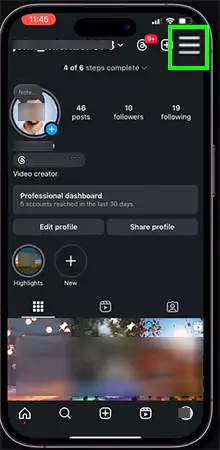
Step 2: Hop onto the notification options.
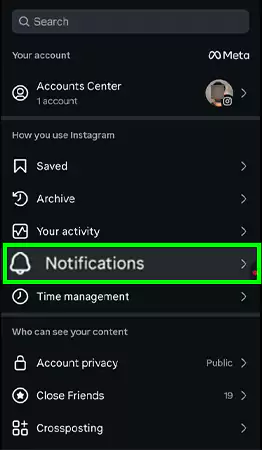
Step 3: After that, you will see a Sleep mode option. Tap on it.
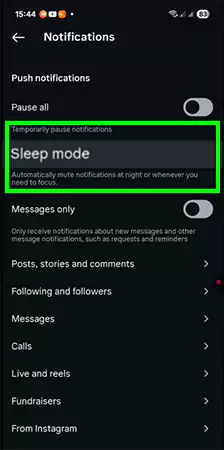
Step 4: Enable the toggle to use this option and customize according to your preference.
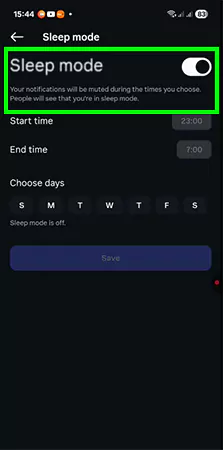
How to disable this setting?
To disable this option, simply follow the instructions mentioned above and disable the toggle to deactivate the option.
Absolutely yes, it helps to improve a lot of physical and mental factors without restricting your Instagram profile, and improves your overall health by promoting:
Fundamentally, the use of quiet mode on Instagram is best for people who love multitasking and don’t want to get distracted from any sort of messages, or someone who loves to spend their “me” time for a while. All it comes down to is when you feel like using it to use it for achieving high privacy and quality time. If you liked this content, then make sure to follow GetAssist for more such pieces.
The benefit of quiet mode on instagram is turn off notifications and send an auto-reply when someone sends you a direct message (DM) to avoid distractions in your important tasks.
First of all, your notifications get stopped, and then Instagram turns on an automation in your DM’s that is empowered by META AI.
Yes, it silences them completely, and you won’t see any messages from anyone.